
Table of Contents
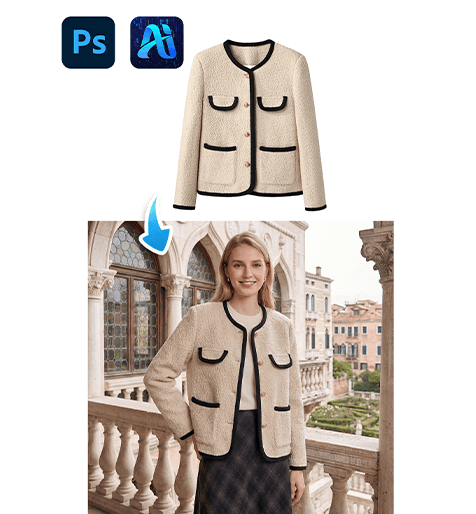
Outerwear plays a major role in fashion photography and seasonal eCommerce catalogs, yet reshooting models for every new coat design is inefficient and costly. With nano banana in the PsAide plugin, creators can seamlessly transfer coat products onto existing model scene images while preserving posture, lighting, and environmental realism.
Through red mask guidance and AI scene recognition, nano banana accurately adapts garment length, sleeve structure, and shadow depth—ensuring the replaced coat blends naturally with the original scene.
1. nano banana Advantages for Coat Replacement
(1)Limitations of Manual Outerwear Editing
Traditional compositing often leads to distorted sleeve length, incorrect proportions, or unrealistic shadows.
(2)How nano banana Enhances Garment Structure
nano banana evaluates body posture, shoulder alignment, and lighting direction to produce realistic coat placement.
2. nano banana Red Mask Coat Workflow
(1)Paint the Original Coat Area Red
① Open the scene image in Photoshop.
② Paint the model’s existing outerwear red.
③ Keep the mask strictly within clothing boundaries.
This step reduces interference from the original garment and clearly defines the transfer region for nano banana.
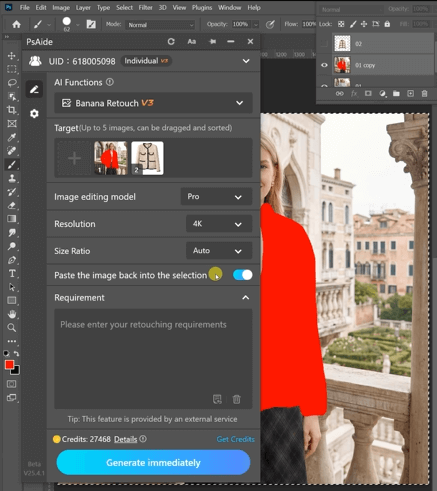
(2)Upload Scene Image and Product Image
① Upload the red-masked scene image.
② Upload the coat product image with a clean background.
③ Maintain high resolution for texture clarity.
(3)Enter a Clear Prompt
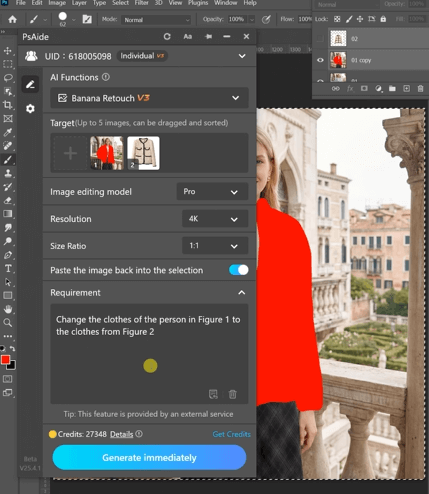
① Specify coat length, color, and fit style.
② Mention natural folds and realistic shadows.
③ Keep the description concise and precise.
Change the clothes of the person in Figure 1 to the clothes from Figure 2
(4)Click Generate
① Click Generate in nano banana.
② Review sleeve alignment and garment scale.
③ Regenerate if refinement is needed.
3. Structural and Lighting Consistency
(1)Natural Garment Proportions
nano banana automatically adjusts coat length and shoulder width.
(2)Shadow and Depth Harmony
Wrinkles and shadows follow the original scene lighting.
4. Practical Use Scenarios
(1)Seasonal Fashion Catalogs
Create multiple coat variations from one photoshoot.
(2)Brand Lookbook Production
Quickly switch between trench, wool, or casual coats.
5. Summary
By combining red mask precision with AI garment analysis, nano banana enables fast and realistic coat replacement suitable for scalable commercial workflows.

Download Link: https://psaide.com/?sfrom=ZfhxUK
Invitation Code: ZfhxUK

