
Table of Contents
Sleepwear is widely used in eCommerce product listings, where brands need multiple variations of the same model image. With nano banana in PsAide, sellers can quickly transfer different pajama designs onto a model without additional photoshoots.
By combining precise region identification and AI garment adaptation, nano banana produces clean, consistent, and commercial-ready results.
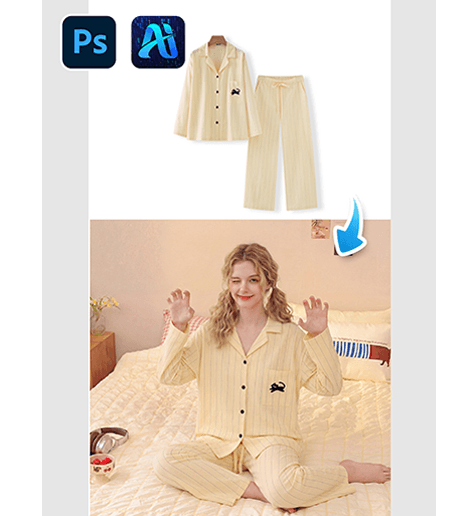
1. nano banana Benefits for Sleepwear Transfer
(1)Inefficiency of Traditional Product Shoots
Capturing every pajama variation on a model requires time, cost, and coordination.
(2)How nano banana Enables Scalable Content
nano banana allows rapid generation of multiple sleepwear styles using one base image.
2. nano banana Workflow for Sleepwear Replacement
(1)Paint the Original Sleepwear Red
① Open the original scene image.
② Paint the model’s existing pajamas red.
③ Avoid covering skin or background.
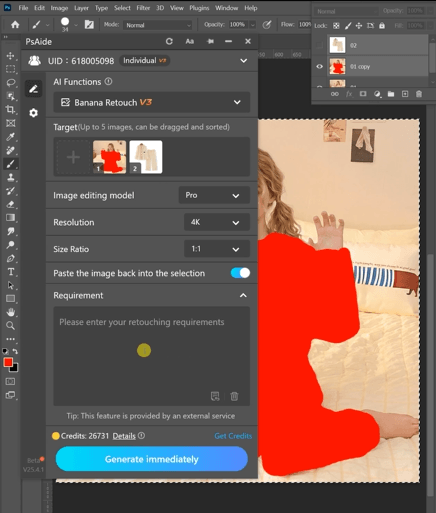
This clearly marks the replacement area for nano banana.
(2)Upload Scene Image and Product Image
① Upload the red-masked scene image.
② Upload the pajama product image.
③ Ensure the product design is clearly visible.
(3)Enter a Prompt
① Describe the pajama color and style.
② Mention clean folds and consistent lighting.
③ Keep the prompt direct.
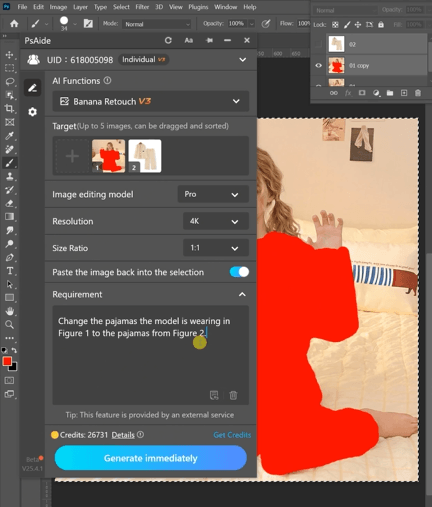
Example prompt:
“Change the pajamas the model is wearing in
Figure 1 to the pajamas from Figure 2.”
(4)Click Generate
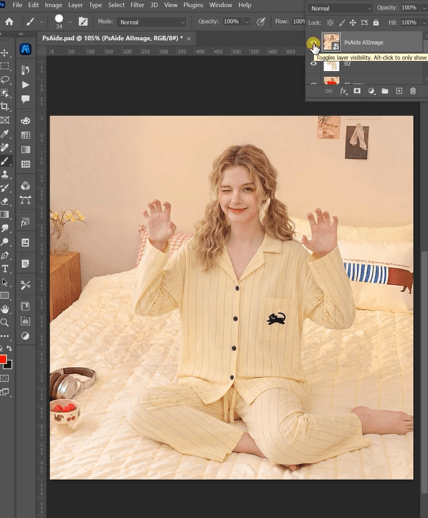
① Click Generate in nano banana.
② Check overall consistency.
③ Regenerate if needed.
3. Commercial Visual Consistency
(1)Clean Product Presentation
nano banana keeps the pajama design clear and accurate.
(2)Lighting Consistency
The generated outfit matches the original scene lighting.
4. Use Cases
(1)eCommerce Product Listings
Generate multiple SKU visuals quickly.
(2)Catalog Updates
Update seasonal sleepwear collections efficiently.
5. Summary
By combining efficient workflow and AI garment rendering, nano banana provides a scalable solution for sleepwear visualization in eCommerce.

Download Link: https://psaide.com/?sfrom=ZfhxUK
Invitation Code: ZfhxUK

