
Table of Contents
Leather jackets are widely used in fashion campaigns and eCommerce visuals, but reshooting models for every new design can be expensive and time-consuming. With nano banana inside the PsAide plugin, creators can seamlessly replace leather jackets directly in scene photos while preserving pose, lighting, and environmental realism.
By combining red mask guidance with AI scene analysis, nano banana accurately adapts material gloss, folds, and reflections—making leather outfit replacement efficient and commercially reliable.
1. nano banana Leather Jacket Replacement Advantages
(1)Challenges of Traditional Leather Editing
Manual compositing often struggles with reflective surfaces, fold alignment, and shadow realism, leading to unnatural results.
(2)How nano banana Enhances Material Realism
nano banana evaluates body posture, sleeve angles, and lighting direction to reproduce leather shine and texture naturally.
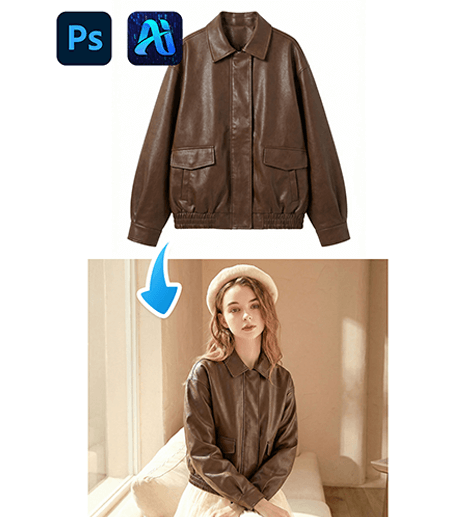
2. nano banana Red Mask Leather Jacket Workflow
(1)Paint the Original Jacket Red
① Open the scene image in Photoshop.
② Paint the model’s existing jacket red.
③ Keep the mask within the clothing boundary to avoid background bleed.
This step reduces interference from the original garment and clearly defines the replacement area for nano banana.
(2)Upload Scene Image and Product Image
① Upload the red-masked scene image.
② Upload the leather jacket product image with a clean background.
③ Maintain high resolution for texture clarity.
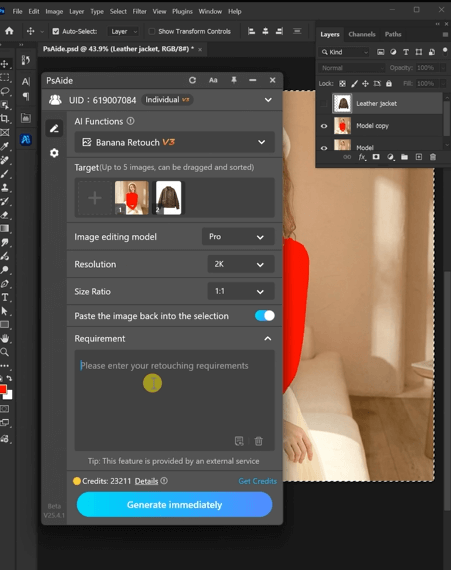
(3)Enter a Clear Prompt
Make the model in image 1 wear the jacket from image 2.
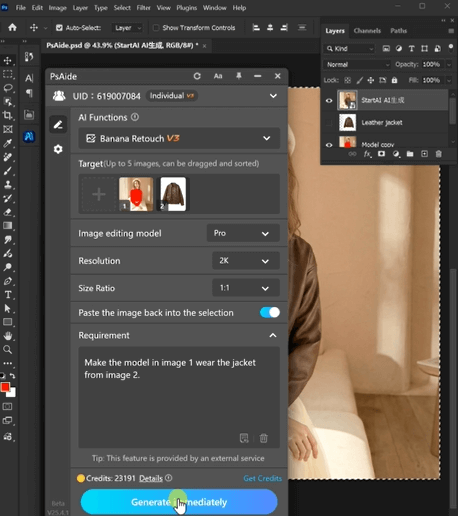
(4)Click Generate
① Click Generate in nano banana.
② Review material gloss and sleeve alignment.
③ Regenerate if subtle refinements are needed.
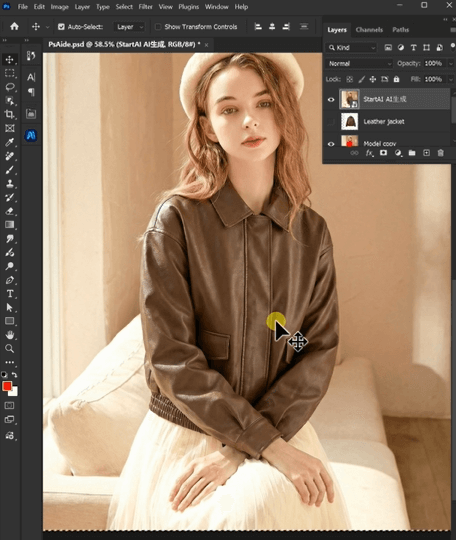
3. Material and Lighting Consistency
(1)Reflective Surface Control
nano banana automatically adapts highlights and shine intensity.
(2)Fold and Shadow Continuity
Wrinkles and shadows follow the model’s posture and environment.
4. Typical Use Cases
(1)Fashion Lookbooks
Create multiple leather styles from a single model photo.
(2)Seasonal Campaigns
Rapidly switch between biker, vintage, or minimalist jackets.
5. Summary
With red mask guidance and AI scene understanding, nano banana enables fast, realistic leather jacket replacement—reducing production costs while maintaining premium visual quality.

Download Link: https://psaide.com/?sfrom=ZfhxUK
Invitation Code: ZfhxUK

