
Table of Contents
In fashion photography and jewelry eCommerce, models often need to showcase multiple accessory combinations without reshooting. With nano banana inside the PsAide plugin, creators can now replace earrings and necklaces simultaneously within a single scene image while preserving facial angles, lighting direction, and outfit harmony.
By using a red mask workflow combined with AI scene understanding, nano banana ensures both accessories integrate naturally with skin tone, hair edges, and collar shadows—making dual jewelry replacement fast, realistic, and production-ready.
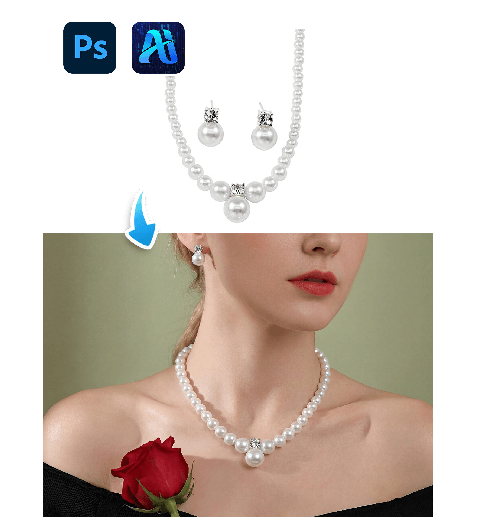
1. nano banana Advantages for Dual Jewelry Replacement
(1)Limitations of Traditional Accessory Editing
Manually editing earrings and necklaces at the same time often results in scale mismatch, floating chains, or inconsistent reflections.
(2)How nano banana Improves Multi-Accessory Accuracy
nano banana analyzes head tilt, neck posture, and lighting conditions to synchronize both accessories naturally within the same scene.
2. nano banana Red Mask Dual Jewelry Workflow
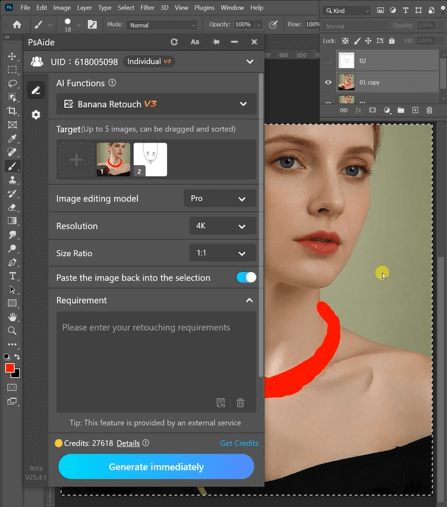
(1)Paint Earrings and Necklace Areas Red
① Open the scene image in Photoshop.
② Paint the existing earrings and necklace areas together in red.
③ Avoid covering hair, skin, or clothing beyond the accessory zones.
This step clearly defines both replacement regions and reduces interference from the original jewelry for nano banana.
(2)Upload Scene Image and Product Images
① Upload the red-masked scene image.
② Upload the earring and necklace product images with clean backgrounds.
③ Ensure good resolution for metal and gemstone detail clarity.
(3)Enter a Clear Prompt
① Specify materials such as gold, silver, or gemstones.
② Mention realistic reflections, chain curvature, and natural shadow blending.
③ Keep the prompt concise but descriptive.
Example prompt:
Remove the necklace worn by the person inImage 1, and then naturally and realistically puton the necklace and earrings from Image 2.
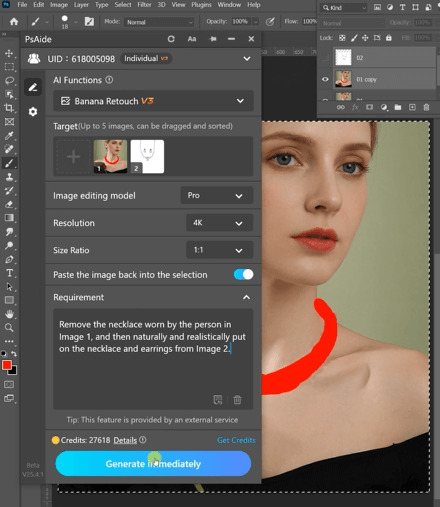
(4)Click Generate
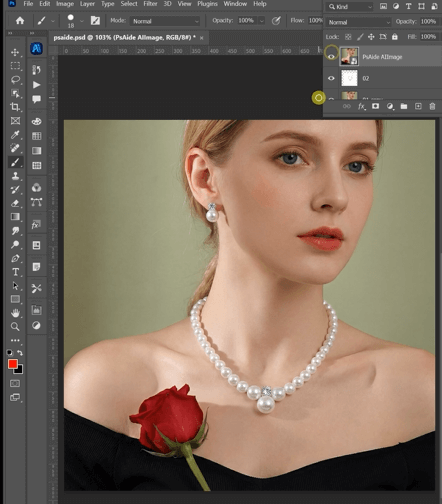
① Click Generate in nano banana.
② Review alignment near ears and collarbones.
③ Regenerate if micro-adjustments are required.
3. Realism Control in Multi-Accessory Integration
(1)Balanced Proportions
nano banana synchronizes the scale of earrings and necklace to avoid visual imbalance.
(2)Lighting and Reflection Harmony
Metal shine and gemstone highlights follow the original environment lighting consistently.
4. Practical Application Scenarios
(1)Jewelry Set Showcases
Display multiple matching accessory sets using a single model image.
(2)Brand Campaign Variations
Quickly test different luxury or minimalist combinations without new photoshoots.
5. Summary
Through red mask guidance and AI scene adaptation, nano banana enables simultaneous earring and necklace replacement with natural alignment and professional visual consistency—ideal for scalable jewelry marketing workflows.

Download Link: https://psaide.com/?sfrom=ZfhxUK
Invitation Code: ZfhxUK

