
Table of Contents
Winter boots often appear in outdoor fashion shoots and seasonal eCommerce product pages. However, photographing every boot variation on a model can be expensive and time-consuming. Using nano banana in the PsAide plugin, creators can easily replace the model’s footwear in a scene image with a new pair of winter boots.
By combining a red mask workflow with AI garment and posture analysis, nano banana produces realistic footwear results that match the model’s pose and the environment.
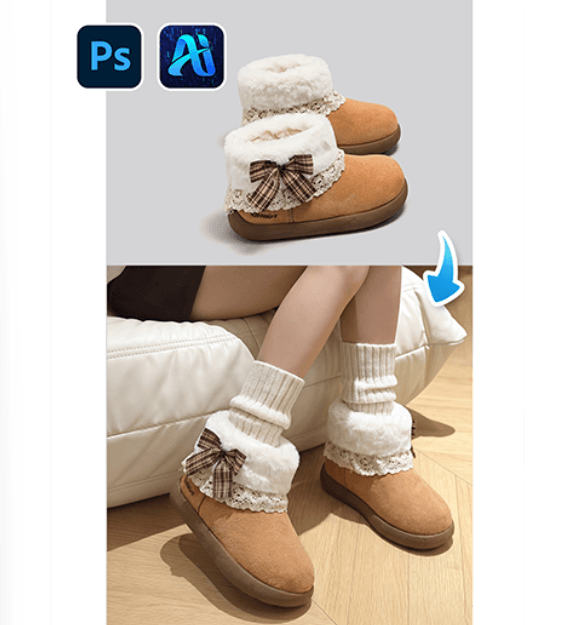
1. nano banana Benefits for Winter Boots Transfer
(1)Limitations of Manual Editing
Traditional compositing requires complex masking and often results in inconsistent lighting or proportions.
(2)AI-Driven Footwear Adaptation
nano banana automatically adjusts the new boots to match the model’s leg posture and perspective.
2. nano banana Red Mask Workflow for Winter Boots
(1)Paint the Original Footwear Red
① Open the scene image in Photoshop.
② Paint the model’s current boots or shoes red.
③ Avoid covering surrounding background areas.
This clearly marks the region for replacement and helps nano banana generate more accurate results.
(2)Upload Scene Image and Product Image
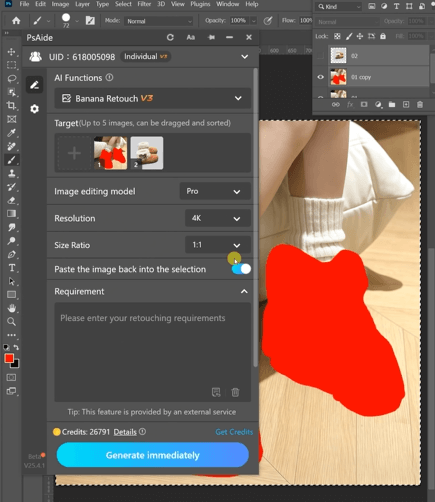
(3)Enter a Prompt
① Describe the winter boots style and color.
② Mention realistic lighting and natural shadows.
③ Keep the prompt short and direct.
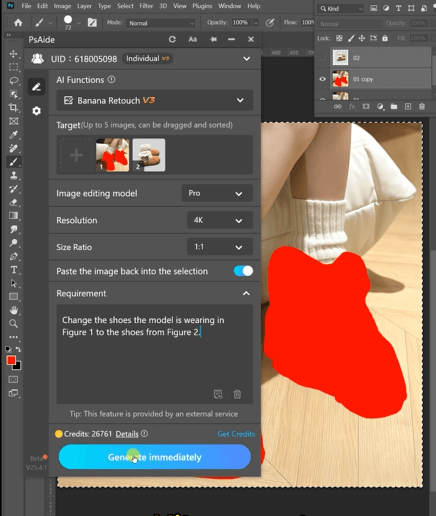
Example prompt:
Change the shoes the model is wearing in
Figure 1 to the shoes from Figure 2.
(4)Click Generate
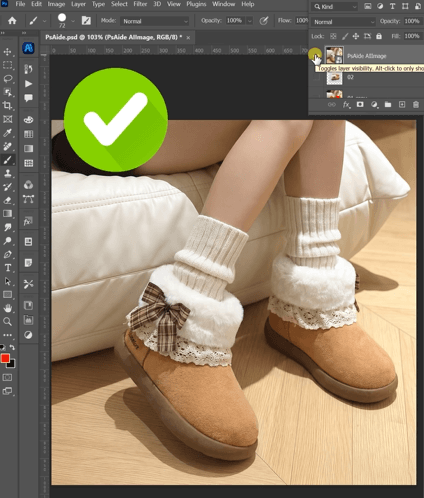
① Click Generate in nano banana.
② Review the final placement of the boots.
③ Regenerate if necessary.
3. Realistic Footwear Rendering
(1)Natural Leg Alignment
nano banana ensures the boots align correctly with the model’s legs.
(2)Consistent Perspective
Boots match the scene’s camera angle and ground contact.
4. Use Cases
(1)Seasonal Product Marketing
Create winter product visuals quickly.
(2)Online Store Product Images
Generate multiple footwear variations using one scene photo.
5. Summary
By combining red mask precision with AI scene understanding, nano banana provides a reliable workflow for replacing winter boots in fashion and eCommerce imagery.

Download Link: https://psaide.com/?sfrom=ZfhxUK
Invitation Code: ZfhxUK

