
Table of Contents
Adding or replacing hats on models is a common requirement in fashion eCommerce and lifestyle photography. With nano banana in PsAide, creators can replace hats directly in scene images using a simple red mask workflow—without rebuilding hair, lighting, or head structure from scratch.
This approach allows brands to reuse one model image across multiple hat styles while maintaining realism and visual consistency.
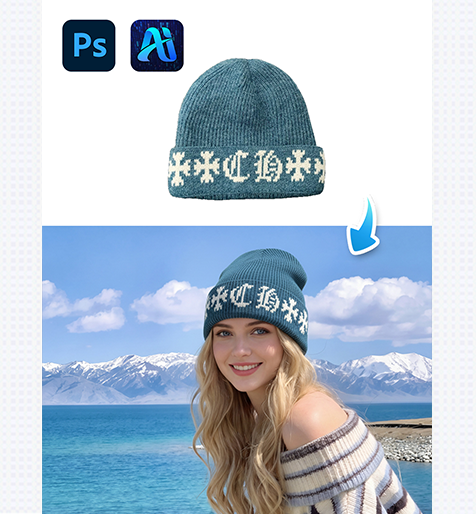
1. Why Use nano banana for Hat Replacement
(1)Limitations of Traditional Hat Editing
Manually adding hats often causes issues such as unnatural hair overlap, incorrect scale, or mismatched lighting.
(2)Advantages of nano banana
nano banana understands head shape, viewing angle, and scene lighting, allowing hats to sit naturally on the model’s head.
2. nano banana Red Mask Workflow for Hats
(1)Paint the Original Hat Area Red
① Open the scene image in Photoshop.
② Paint the existing hat—or the area where the hat will appear—red.
③ Avoid covering hair or background beyond the headwear region.
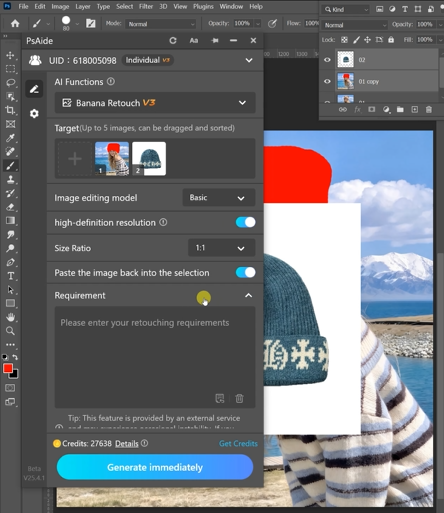
This step clearly defines the replacement zone for nano banana.
(2)Upload Scene Image and Hat Product Image
① Upload the red-masked scene image.
② Upload the hat product image with a clean background.
③ Ensure the hat angle matches the model’s head orientation.
(3)Enter a Clear Prompt
① Describe the hat style, color, and material.
② Mention realistic shadows and natural hair interaction.
③ Keep the prompt concise and specific.
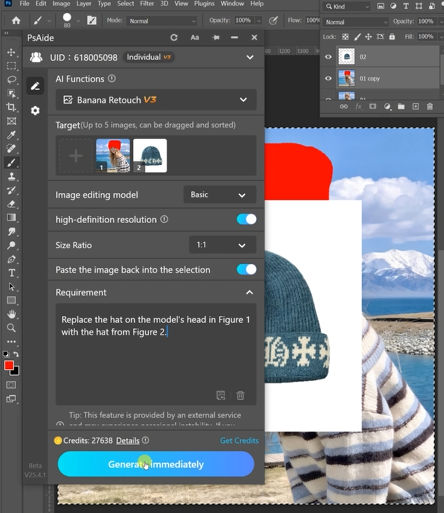
(4)Click Generate
① Click Generate in nano banana.
② Review placement and proportions.
③ Regenerate if fine adjustments are needed.
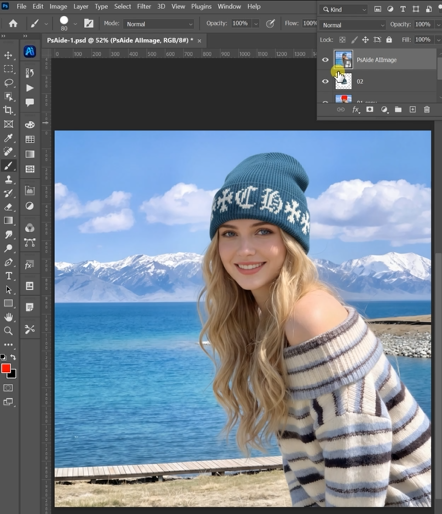
3. Controlling Realism in Hat Replacement
(1)Natural Hair Interaction
nano banana blends the hat edge smoothly with hairlines and head contours.
(2)Consistent Lighting
The generated hat inherits light direction and shadow softness from the original scene.
4. Summary
By combining red mask guidance with AI scene understanding, nano banana enables fast, realistic hat replacement—making headwear editing efficient, scalable, and production-ready.

Download Link: https://psaide.com/?sfrom=ZfhxUK
Invitation Code: ZfhxUK

