
Table of Contents
Decorative pillows are essential elements in bedroom photography and home decor eCommerce visuals. However, reshooting every pillow design in a styled room can be time-consuming and costly. With nano banana in the PsAide plugin, creators can replace pillows directly within an existing bedroom scene while maintaining realistic lighting, fabric texture, and spatial consistency.
By using a red mask workflow, nano banana accurately identifies the pillow area and integrates the new design seamlessly into the environment.
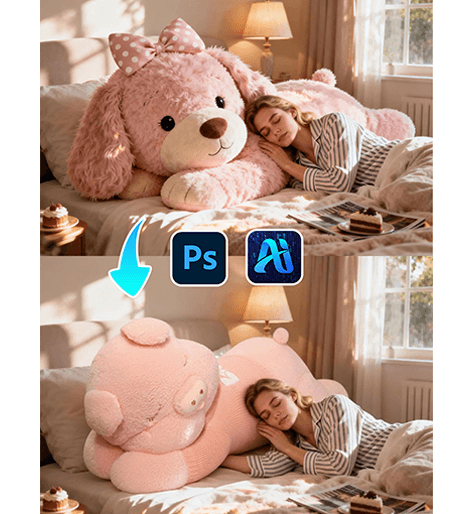
1. nano banana Advantages for Pillow Replacement
(1)Limitations of Manual Scene Editing
Traditional editing often leads to inconsistent lighting, unnatural placement, or mismatched fabric textures.
(2)How nano banana Enhances Scene Realism
nano banana analyzes surrounding elements such as bed structure, lighting direction, and fabric softness to generate natural pillow integration.
2. nano banana Workflow for Pillow Replacement
(1)Paint the Original Pillow Area Red
① Open the bedroom scene image in Photoshop.
② Paint the existing pillow red.
③ Keep the mask strictly within the pillow boundaries.
This step helps nano banana clearly define the replacement region and reduces interference from the original object.
(2)Upload Scene Image and Product Image
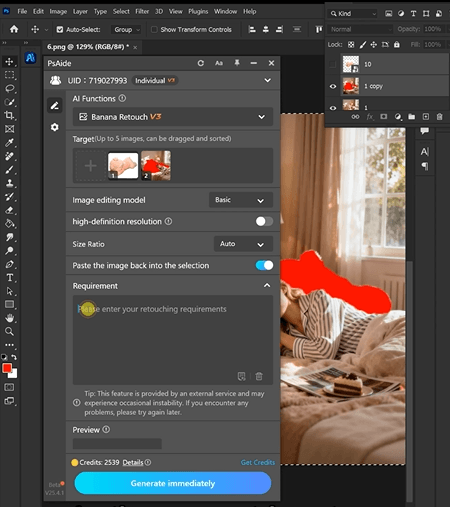
① Upload the red-masked scene image.
② Upload the pillow product image.
③ Ensure the product image shows clear texture and shape.
(3)Enter a Prompt
① Describe pillow color, size, and fabric (cotton, velvet, etc.).
② Mention natural folds and realistic shadows.
③ Keep the prompt concise.
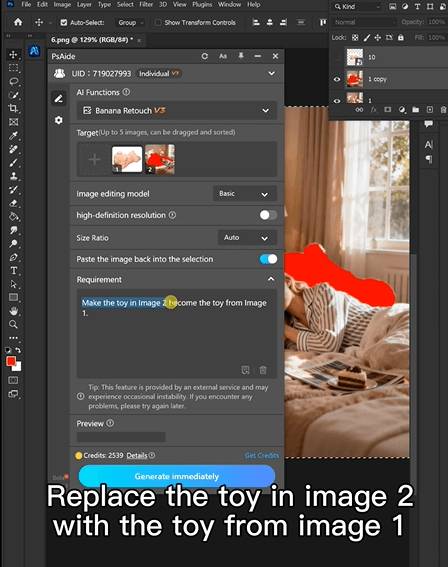
Example prompt:
”Replace the toy in image 2 with the toy from image 1“
(4)Click Generate
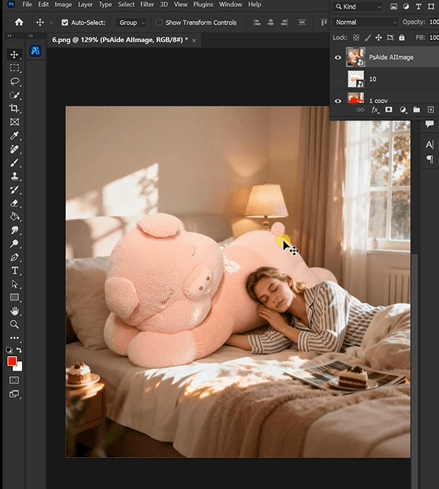
① Click Generate in nano banana.
② Review placement and fabric integration.
③ Regenerate if needed.
3. Fabric and Placement Realism
(1)Natural Softness and Shape
nano banana preserves pillow volume and soft fabric deformation.
(2)Lighting Consistency
Shadows and highlights match the bedroom environment.
4. Application Scenarios
(1)Home Decor eCommerce Listings
Quickly generate multiple pillow variations.
(2)Interior Styling Visuals
Update room aesthetics without reshooting.
5. Summary
With red mask precision and intelligent scene understanding, nano banana enables efficient and realistic pillow replacement, making home decor visualization faster and more scalable.

Download Link: https://psaide.com/?sfrom=ZfhxUK
Invitation Code: ZfhxUK

