
Table of Contents
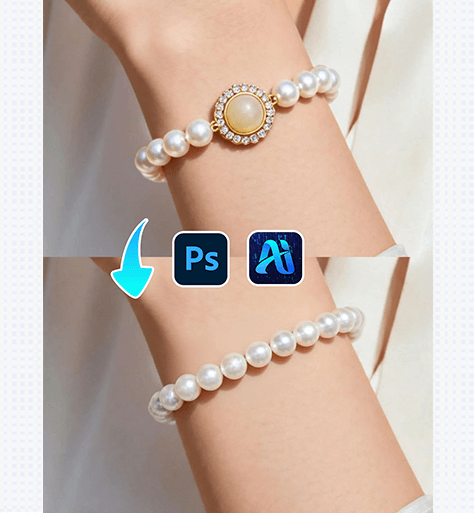
In fashion and jewelry visuals, adding bracelets to models often requires precise masking and repeated adjustments. Wrist angles, skin contact, and reflections make manual editing inefficient.
With PsAide powered by nano banana, you can seamlessly place bracelets on models while preserving wrist proportions, skin texture, and natural lighting—ideal for eCommerce and commercial campaigns.
1. nano banana Bracelet Placement Workflow
Using PsAide’s nano banana technology, adding a bracelet to a model can be completed quickly and with high visual accuracy.
(1)Import the Model Image and Identify the Wrist Area
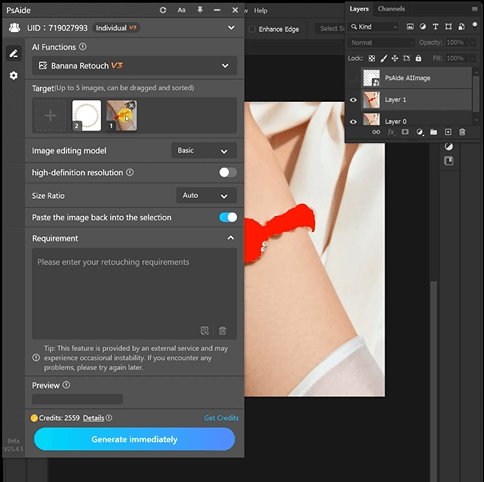
Open the model image in Photoshop and ensure the wrist and hand area are clearly visible. Clear wrist structure allows nano banana to generate a natural bracelet fit.
Best Practices
①Keep the wrist unobstructed by sleeves or props
②Maintain a natural hand posture
③Simple backgrounds improve nano banana precision
(2)Apply PsAide nano banana for Bracelet Placement
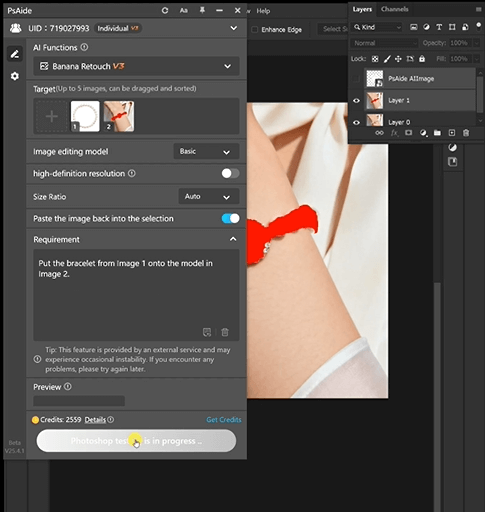
Activate nano banana in PsAide and enter a prompt
Put the bracelet from Image 1 onto the model in Image 2.
nano banana Key Advantages
①Accurate bracelet sizing and positioning
②Natural skin contact and shadow rendering
③Realistic material texture and reflections
(3)Refine Details and Export the Final Image
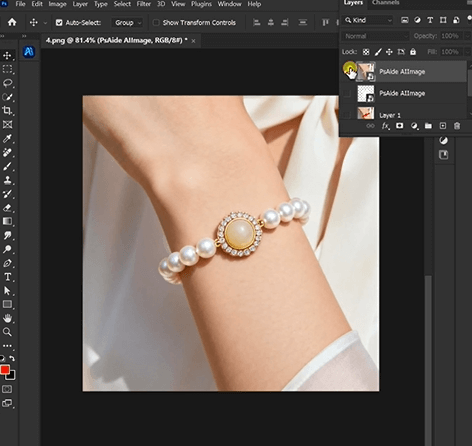
nano banana outputs high-quality bracelet results that usually require only minor refinements before final export.
Recommended Final Checks
①Ensure the bracelet sits naturally on the wrist
②Check spacing between bracelet and skin
③Confirm highlight direction matches original lighting
2. nano banana Use Cases for Bracelet Editing
nano banana supports multiple jewelry visualization scenarios:
(1)Multiple Bracelet Designs from One Model
Create various bracelet styles or materials using the same model image while keeping wrist posture consistent with nano banana.
(2)Complete Jewelry Set Visualization
Easily combine bracelets with necklaces or rings using nano banana for cohesive product visuals.
(3)Consistent Bracelet Display Across Platforms
nano banana ensures uniform bracelet appearance across eCommerce stores, ads, and lookbooks.
3. Why nano banana Is Better Than Manual Bracelet Editing
Compared to traditional bracelet retouching, nano banana provides clear advantages:
①No distortion of wrist or hand proportions
②No complex masking around skin
③Natural depth, shine, and shadow
④Faster workflow with fewer revisions
For jewelry brands and online sellers, nano banana offers an efficient and scalable solution for professional bracelet visuals.

Download Link: https://psaide.com/?sfrom=ZfhxUK
Invitation Code: ZfhxUK

