
Table of Contents
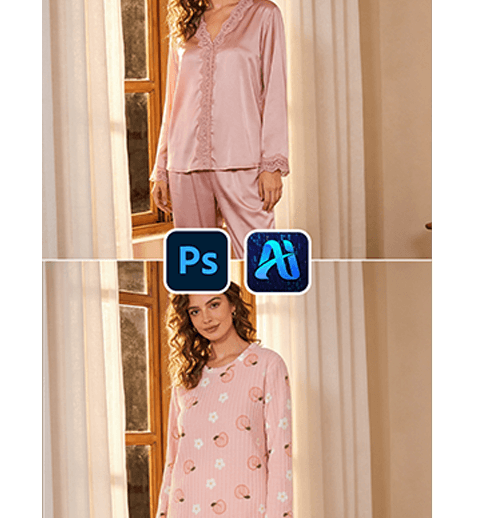
Pajamas play a key role in lifestyle photography, especially for homewear brands and cozy-themed campaigns. Instead of reshooting models for each new pajama design, nano banana in the PsAide plugin allows creators to replace sleepwear directly in existing scene images while preserving natural posture and lighting.
With intelligent garment analysis, nano banana ensures soft fabric draping, relaxed fit, and realistic indoor lighting integration.
1. nano banana Advantages for Pajama Replacement
(1)Challenges in Manual Loungewear Editing
Traditional editing often results in stiff fabric appearance or unnatural folds, especially for soft materials like cotton or silk.
(2)How nano banana Improves Fabric Realism
nano banana analyzes body posture and fabric softness to generate natural draping and relaxed silhouettes.
2. nano banana Workflow for Pajama Replacement
(1)Paint the Original Pajama Area Red
① Open the scene image in Photoshop.
② Paint the model’s current sleepwear red.
③ Keep the mask within the clothing area.
This step helps nano banana clearly identify the replacement region and avoids interference from the original outfit.
(2)Upload Scene Image and Product Image
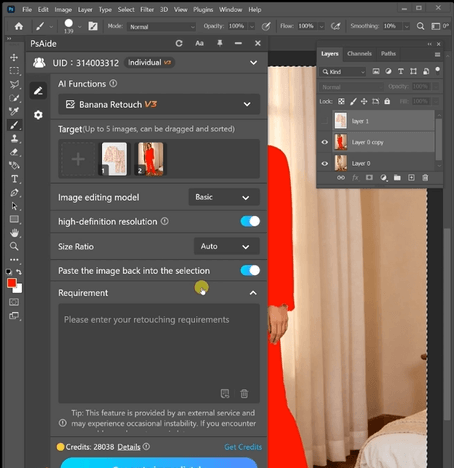
① Upload the red-masked scene image.
② Upload the pajama product image.
③ Ensure the fabric texture is clearly visible.
(3)Enter a Prompt
① Describe pajama style (loose fit, silk, cotton).
② Mention soft folds and natural indoor lighting.
③ Keep the prompt concise.
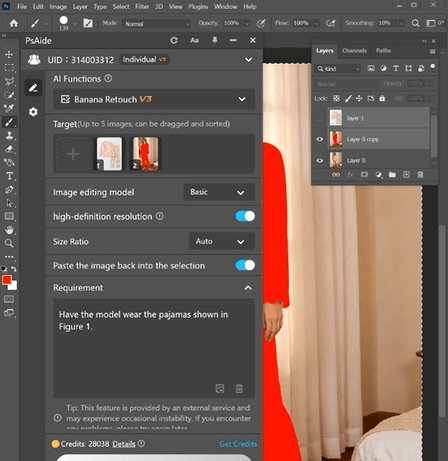
Example prompt:
“Have the model wear the pajamas shown in
Figure 1.”
(4)Click Generate
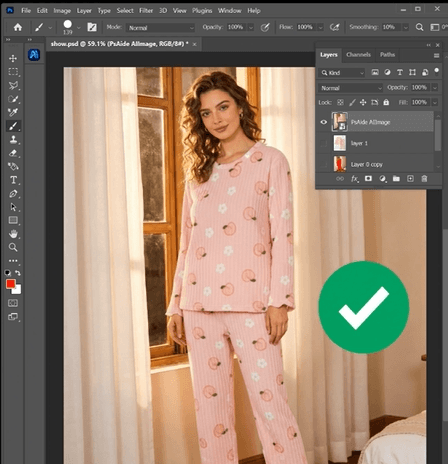
① Click Generate in nano banana.
② Review fabric draping and fit.
③ Regenerate if needed.
3. Fabric Softness and Comfort Expression
(1)Natural Draping
nano banana preserves the relaxed fit typical of sleepwear.
(2)Indoor Lighting Harmony
Soft shadows match the cozy environment.
4. Application Scenarios
(1)Homewear Brand Campaigns
Create multiple pajama looks from one scene.
(2)Lifestyle Content Creation
Produce cozy indoor visuals efficiently.
5. Summary
With accurate fabric rendering and simple workflow, nano banana enables realistic pajama replacement for lifestyle and eCommerce visuals.

Download Link: https://psaide.com/?sfrom=ZfhxUK
Invitation Code: ZfhxUK

