
Table of Contents
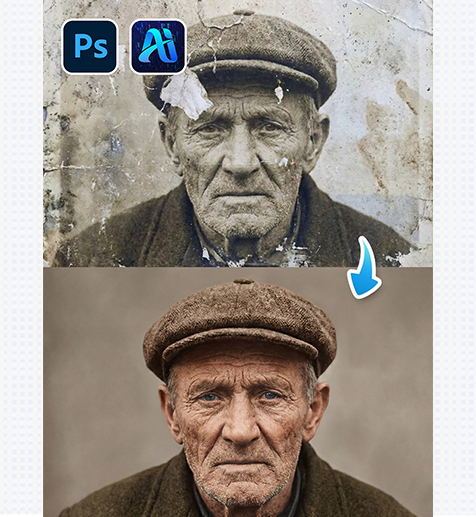
Old photos often suffer from fading, scratches, blur, and loss of detail due to aging, improper storage, or outdated shooting conditions. With nano banana in PsAide, restoring old photos no longer requires complex manual retouching or professional restoration skills.
By simply uploading the original image and entering a descriptive prompt, nano banana intelligently repairs damaged areas, enhances clarity, and restores visual consistency—while preserving the original character of the photo.
1. Why Use nano banana for Old Photo Restoration
(1)Common Problems in Old Photos
Old photographs frequently show color fading, noise, cracks, uneven exposure, and missing details, making manual restoration slow and technically demanding.
(2)How nano banana Improves Restoration Efficiency
Instead of relying on layer-by-layer retouching, nano banana analyzes the entire image structure, facial features, textures, and lighting to perform holistic restoration with natural results.
2. nano banana Simple Restoration Workflow
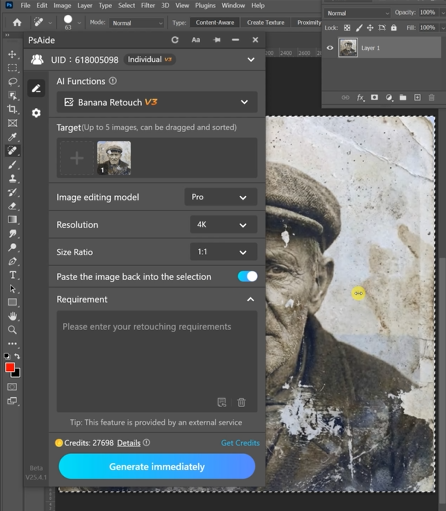
(1)Upload the Old Photo
① Open the PsAide plugin.
② Upload the original old or damaged photo.
③ No masking or red painting is required.
(2)Enter a Clear Restoration Prompt
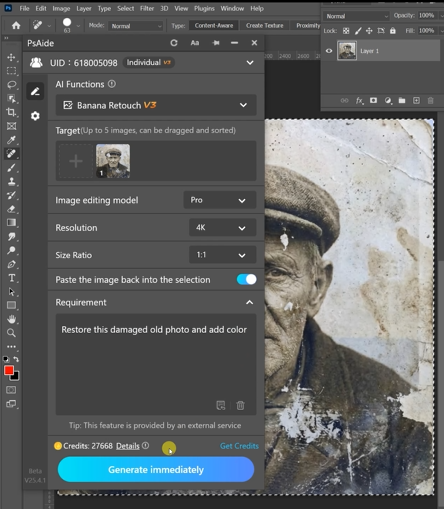
① Describe the desired restoration goal.
② Mention details such as improved clarity, reduced scratches, or balanced tones.
③ Keep the prompt focused and realistic.
Example prompt:
“Restore this damaged old photo and add color”
(3)Click Generate
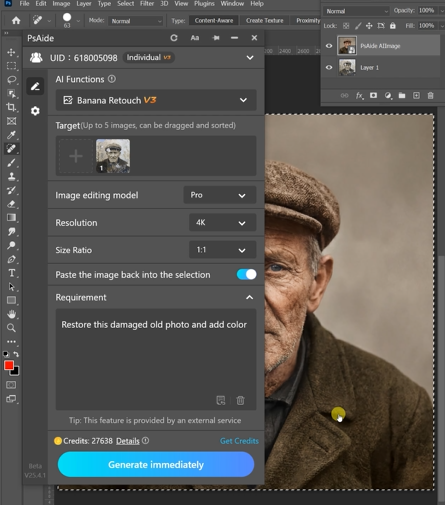
① Click Generate in nano banana.
② Review the restored result.
③ Regenerate if subtle adjustments are needed.
3. What nano banana Can Restore
(1)Facial Details and Skin Texture
nano banana enhances facial clarity while avoiding over-smoothing.
(2)Photo Texture and Contrast
Cracks, dust, and noise are reduced while preserving original grain.
(3)Overall Tone and Balance
The restored image maintains a natural, period-appropriate appearance.
4. Summary
With its prompt-based workflow, nano banana makes old photo restoration fast, accessible, and visually reliable—allowing users to revive aging images without complex manual editing.

Download Link: https://psaide.com/?sfrom=ZfhxUK
Invitation Code: ZfhxUK

