
Table of Contents
Sleepwear brands often need to showcase multiple pajama sets on the same model and background. Manual retouching can distort fabric softness and folds. nano banana in PsAide enables realistic pajama set replacement while preserving body posture and cozy fabric texture.
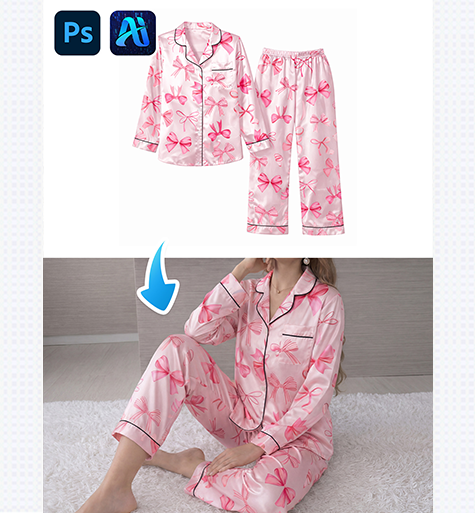
1. nano banana Method for Pajama Set Swapping
This workflow ensures smooth transitions for soft, loose-fitting garments.
(1)Paint the Original Pajama Set Red
Paint the existing pajama top and bottoms red in Photoshop.
This isolates the replacement area and allows nano banana to focus on fabric flow and silhouette.
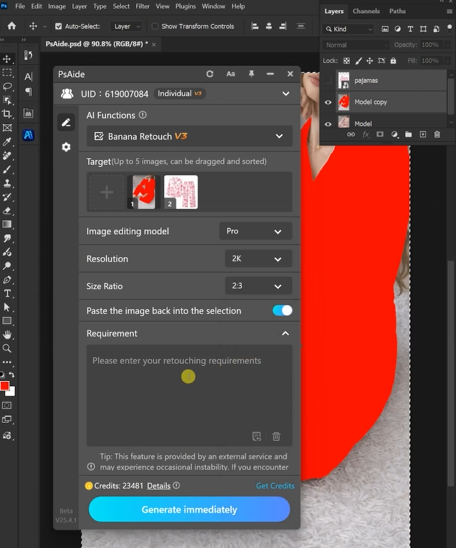
(2)Upload Scene and Pajama Product Images
Upload:
①Scene image with red-painted pajamas
②Product image of the new pajama set
nano banana evaluates drape, looseness, and fabric continuity.
(3)Describe the Desired Result
Prompt example:
Dress the model from Image 1 in the pajamas
and pajama pants from Image 2.
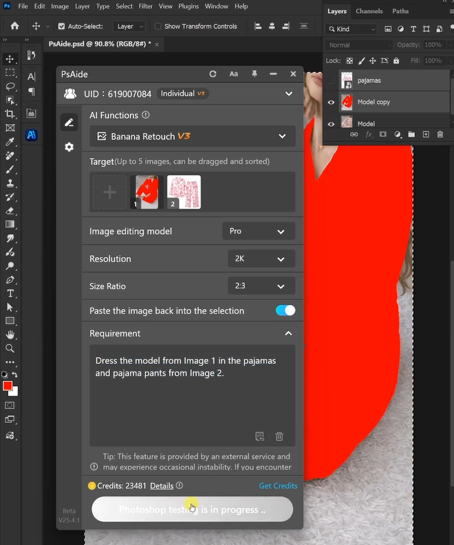
(4)Generate and Adjust
Click Generate to receive a natural-looking pajama replacement.
Fine-tune via prompt updates if needed.
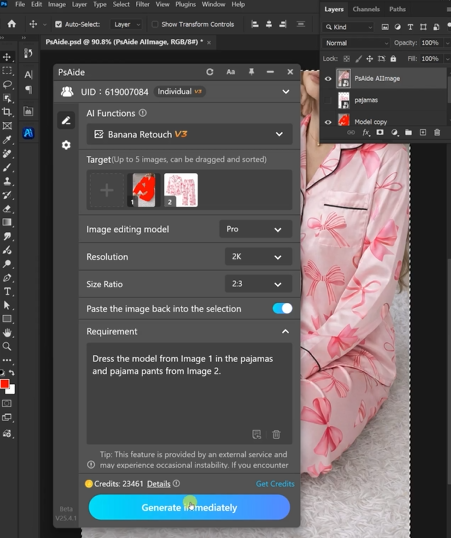
2. nano banana for Sleepwear Marketing
- Preserves soft fabric characteristics
- Ideal for lifestyle bedroom scenes
- Enables fast SKU expansion
- Consistent visual tone across listings
3.Conclusion
nano banana in PsAide makes pajama set replacement effortless, accurate, and production-ready for e-commerce.

Download Link: https://psaide.com/?sfrom=ZfhxUK
Invitation Code: ZfhxUK

