
Table of Contents
Getting professional pet photos with different outfits usually means multiple reshoots, studio time, and manual Photoshop edits. Clothing folds, fur texture, and irregular poses make traditional editing slow and challenging.
With PsAide powered by nano banana, you can easily swap pet outfits—like sweaters, costumes, and seasonal wear—while keeping the pet’s pose, fur details, and lighting natural and realistic.
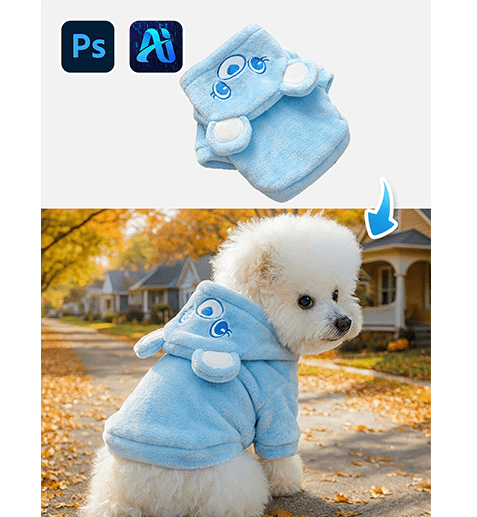
1. nano banana Pet Outfit Swap Workflow
Using PsAide’s nano banana technology, changing a pet’s outfit becomes a fast and natural process—no need for complicated masking or manual compositing.
(1)Choose Your Pet Photo and Target Outfit Images
Open Photoshop and prepare:
A pet image with clear body and fur details
The outfit image (e.g., pet sweater, costume) with a plain or simple background
This helps nano banana understand both shapes before editing.
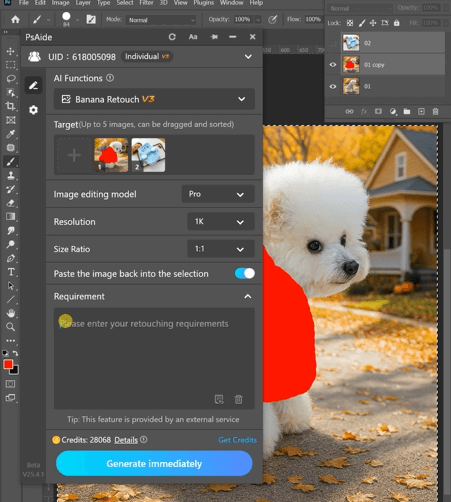
Setup Best Practices
①Ensure the pet’s body and limbs aren’t heavily occluded
②Pick outfits that match the pet’s pose and size
③Simple backgrounds make AI alignment easier
(2)Launch PsAide and Define Swap Instructions
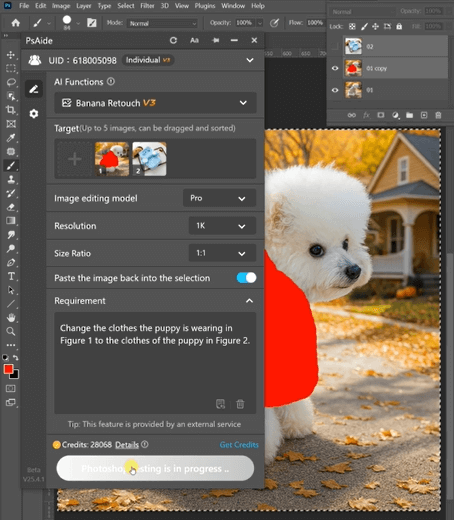
In Photoshop, open PsAide and activate nano banana. With both images imported, type a clear prompt such as:
Change the clothes the puppy is wearing in Figure 1 to the clothes of the puppy in Figure 2.
nano banana will analyze posture, fur and lighting to generate a realistic outfit swap.
nano banana Key Advantages
①Automatically adapts outfit size and angle to pet posture
②Preserves fur texture and natural shadows
③Blends outfit seamlessly without obvious edges
(3)Review and Refine the Final Pet Portrait
Once nano banana produces the result, check alignment and details.
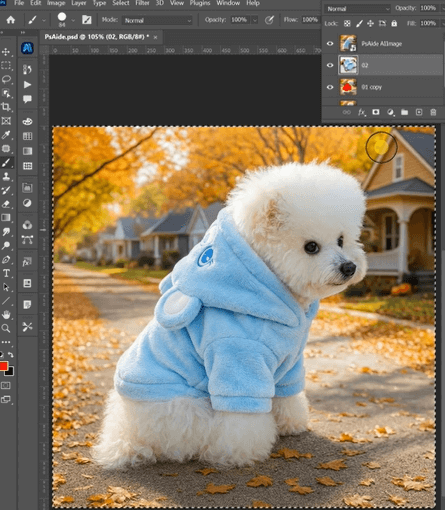
Suggested Final Checks
①Make sure the outfit fits the pet’s body naturally
②Look for consistent lighting and shadow direction
③Smooth any minor edges with Photoshop tools if needed
2. nano banana Pet Outfit Swap Use Cases
nano banana isn’t just for one-off swaps—its capabilities scale across many pet content scenarios:
(1)Seasonal Pet Fashion Updates
Generate winter sweaters, Halloween costumes, or summer outfits on the same pet photo quickly.
(2)Social Media & E-Commerce Ready Images
Create a series of pet photos with different looks for listings, ads, or social platforms.
(3)Batch Outfit Variations
Produce multiple outfit versions from one pet image without extra photoshoots.
3. Why nano banana Excels Over Traditional Pet Editing
Traditional editing requires manual masking around fur, multiple layers, and time-intensive refinements. nano banana removes all that:
①No need to manually cut fur or edges
②Clothes adapt to body angle and lighting automatically
③Saves time and improves output consistency
④Ideal for high-volume pet content workflows
For pet photographers, content creators, and eCommerce sellers alike, nano banana brings professional outfit swaps within reach—even without advanced Photoshop skills.

Download Link: https://psaide.com/?sfrom=ZfhxUK
Invitation Code: ZfhxUK

