
Table of Contents
In fashion eCommerce and commercial photography, replacing footwear—especially bulky winter snow boots—can be time-consuming and expensive. Traditional retouching often struggles with boot volume, shadows, and perspective.
With PsAide powered by nano banana, you can seamlessly replace snow boots on models without reshooting, rebuilding 3D models, or manual compositing, while maintaining realistic proportions and textures.
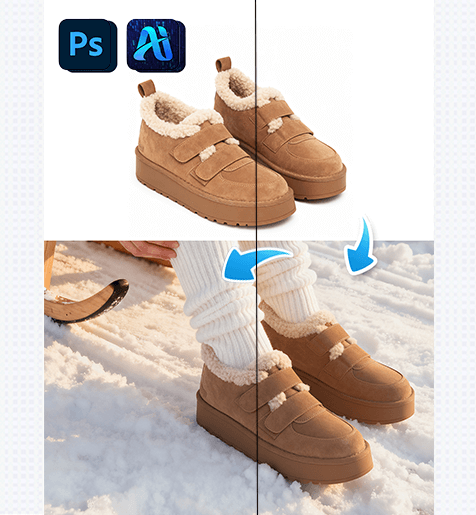
1. nano banana Snow Boot Replacement Workflow
Using PsAide’s nano banana technology, replacing snow boots on a model can be completed in just a few simple steps, producing clean and professional results suitable for eCommerce platforms.
(1)Import the Model Image and Identify the Foot Area
Open the original model image in Photoshop. Accurate foot structure is essential for nano banana to generate realistic snow boots.
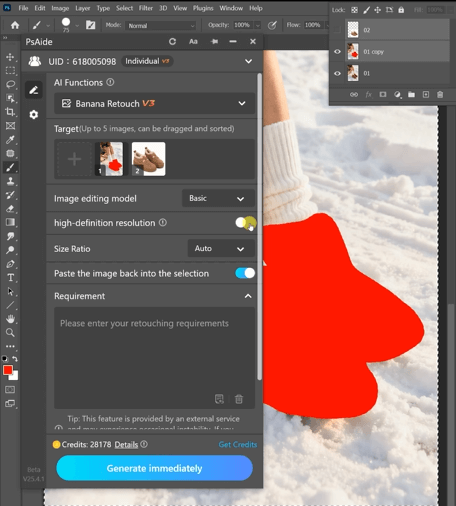
Best Practices
①Keep the original leg posture and body proportions
②Simple backgrounds improve nano banana accuracy
(2)Apply PsAide nano banana for Snow Boot Swapping
Launch PsAide and activate nano banana, then input a prompt related to snow boot replacement. nano banana automatically analyzes foot shape, angle, and lighting to generate a natural boot replacement.
Change the shoes the model is wearing in Figure 1 to the shoes from Figure 2.
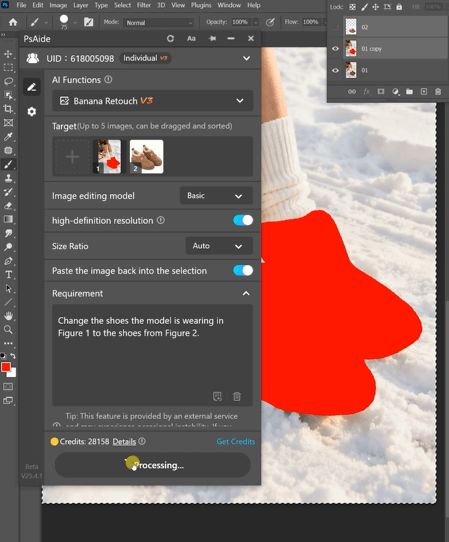
nano banana Key Advantages
①Automatically matches ankle height and boot shaft
②Preserves original lighting and ground shadows
③Maintains realistic snow boot volume and structure
(3)Refine Details and Export the Final Image
The snow boots generated by nano banana are highly complete. Only minimal adjustments are required before exporting the final image.
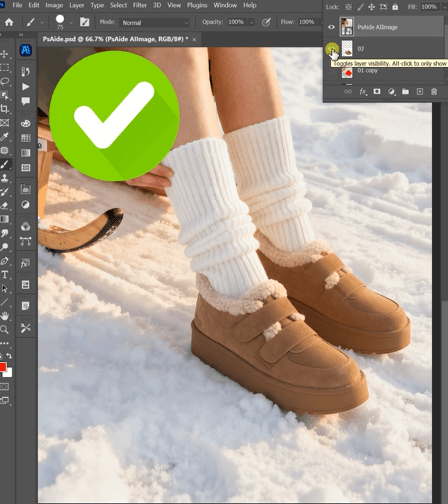
Recommended Final Checks
①Ensure the sole sits naturally on the ground
②Check the transition between pants and boot shaft
③Confirm the texture reflects winter boot materials
2. nano banana Use Cases for Snow Boot Editing
nano banana is not limited to basic footwear replacement. It is ideal for multiple commercial scenarios:
(1)Multi-SKU Snow Boot Variations
Create multiple snow boot styles or colors using the same model image while keeping posture and proportions identical with nano banana.
(2)Seasonal Footwear Conversion
Quickly convert regular shoes into winter snow boots using nano banana—no new photoshoots required.
(3)Consistent Visuals Across Platforms
nano banana ensures consistent snow boot appearance for product listings across multiple marketplaces.
3. Why nano banana Outperforms Traditional Retouching
Compared to manual masking and compositing, nano banana offers clear advantages:
①No distortion of model proportions
②No manual shadow painting
③Natural snow boot depth and realism
④Significant reduction in editing time and cost
For brands and sellers focused on efficiency and conversion, nano banana is a reliable solution for professional snow boot replacement.

Download Link: https://psaide.com/?sfrom=ZfhxUK
Invitation Code: ZfhxUK

