Table of Contents
1.Quick Q&A: AI-Powered Jacket Replacement in PS
Q: Can AI efficiently replace a model’s jacket in Photoshop?
A: Yes. PsAide’s Nano Banana simplifies PS jacket replacement with AI, finishing in 2 minutes with natural results.
Q: Need professional PS skills for Nano Banana?
A: No. Beginners can master it in 3 simple steps without complex PS operations.
For fashion marketers, e-commerce sellers and content creators, showcasing diverse apparel on models is key to conversions. However, traditional PS jacket replacement is time-consuming and frustrating: it requires outlining the original jacket with the Pen Tool, warping the new clothing to fit the pose, and tedious lighting/color tweaks. Even skilled users spend 1–2 hours per image, often resulting in unnatural effects like mismatched proportions or stiff folds. This is where Nano Banana, a feature in the PsAide plugin, revolutionizes PS workflows—enabling fast, seamless and professional jacket replacement in just 2 minutes.
2.3-Step Guide to Replace Model’s Jacket with Nano Banana in PS
Nano Banana lets you skip complex PS tools. Here’s the detailed 3-step process:
1.Prepare Red-Colored Model Image:
- Open the model photo in PS (compatible with 2015+).
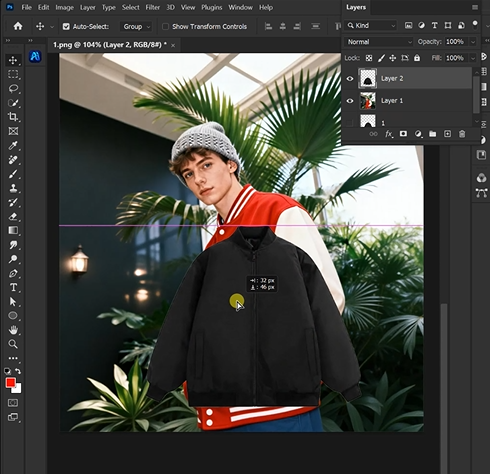
- PsAide plugin installed.
- Select the Brush Tool, set color to red, and paint the model’s jacket (helps AI identify the replacement area).
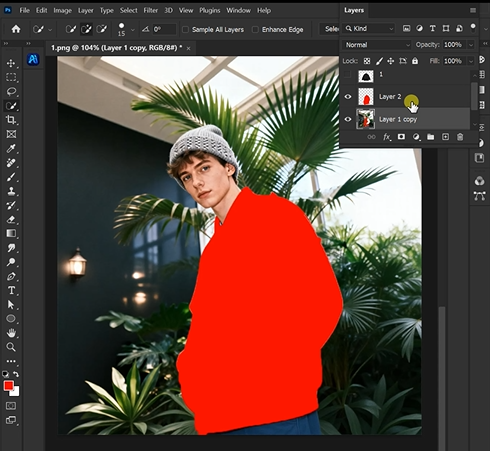
2.Launch Nano Banana and Upload Images:
- Install PsAide, select “Nano Banana” from PS’s Plugins menu. Upload Image 1 (new jacket photo, plain background preferred) and Image 2 (red-painted model image).
- Type the prompt: “Make the model in Image2 wear the clothing from Image1.”

3.Generate and Finalize:
Click “Generate.” Nano Banana AI analyzes the red area, applies the new jacket, and adjusts proportions/folds/lighting to match the model and scene (30–40 seconds).
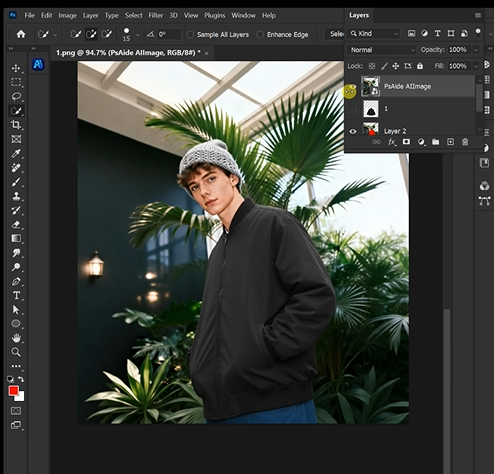
Nano Banana outperforms traditional PS editing with advanced AI that understands 3D body contours, fabric dynamics and scene lighting. Unlike manual flat-layer overlays, it analyzes the model’s posture, original jacket fit and new clothing material, ensuring the replaced jacket fits naturally with realistic folds and lighting. Whether it’s denim, leather or puffer jackets, Nano Banana delivers results that look authentic—surpassing manual PS edits.
3.Why Nano Banana Outperforms Traditional PS Jacket Replacement
Nano Banana has three key advantages over manual PS editing: 1)
Time-saving: Cuts editing from hours to 2 minutes, ideal for bulk tasks like e-commerce catalog updates. 2)
Naturalness: AI’s 3D body recognition and fabric simulation ensure perfect fit, avoiding stiff “cut-and-paste” looks. 3)
User-friendly: Red coloring simplifies area identification, no advanced PS skills required for professional results.
4.Industry Applications of Nano Banana
This feature benefits multiple professionals: Fashion e-commerce brands can showcase multiple jacket styles on one model without reshooting (reducing costs); marketing agencies streamline campaign visuals with consistent quality; content creators polish social media fashion content efficiently. All highlight Nano Banana’s transformation of traditional PS fashion editing workflows.
Download link
https://psaide.com/?sfrom=A86R4u
Invitation Code: A86R4u