Table of Contents
For home decor e-commerce sellers, interior designers, and lifestyle brand marketers, high-quality images of vases in real-life scenes are crucial to driving sales. A well-placed vase—whether on a dining table, shelf, or mantel—can showcase its design, size, and how it complements a space, directly resonating with consumers’ decorating needs. However, traditional methods of replacing vases in photos are costly, time-consuming, and unconvincing. NanoBanana, the AI-powered feature embedded in the PsAide plugin for Photoshop, revolutionizes this process by enabling seamless vase replacement with just one click, outperforming manual Photo Retouching significantly.
Pain Points of Traditional Vase Replacement in Photos
Before NanoBanana, replacing a vase in photos posed major challenges. Brands had to reshoot entire scenes—setting up new backdrops, arranging props, and ensuring lighting matched the original image—costing $300+ per reshoot and taking 1–3 days. Manual editing with basic Photoshop tools was no better: the new vase often looked misaligned with the scene, ceramic or glass textures appeared distorted, and shadows clashed with the original lighting. These unnatural results eroded consumer trust, and maintaining consistency across a vase product line became a logistical nightmare.
PsAide’s NanoBanana: AI-Powered Vase Replacement
NanoBanana leverages advanced AI technology to overcome these pain points. It intelligently analyzes the original scene’s lighting, the placement space, and the new vase’s dimensions and texture to ensure seamless integration. A test replacing a plain ceramic vase with a hand-painted glass vase in a living room photo proved its efficacy: the new vase fit perfectly on the shelf, the glass’s transparency and paint details looked authentic, and the shadow cast by the vase aligned with the room’s ceiling light. The result was indistinguishable from a professionally shot image, with no traces of editing.
Tutorial materials that can be used for practice
Before:
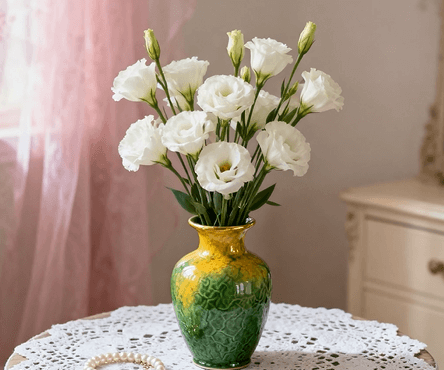
After:
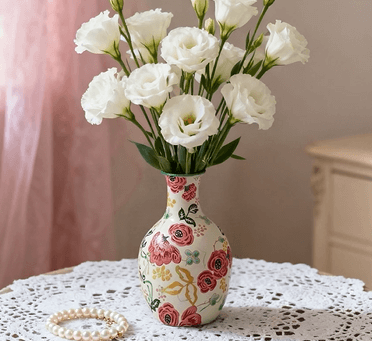
3-Step Guide to Replace Vase with NanoBanana
NanoBanana’s integration with Photoshop makes it incredibly user-friendly, even for those with basic editing skills. Follow these three simple steps:
- Launch NanoBanana and Upload Images: Open Photoshop, install the PsAide plugin, and launch NanoBanana from the plugin menu. Upload two images: Image 1 (the original photo with the old vase) and Image 2 (the new vase product image to replace with).
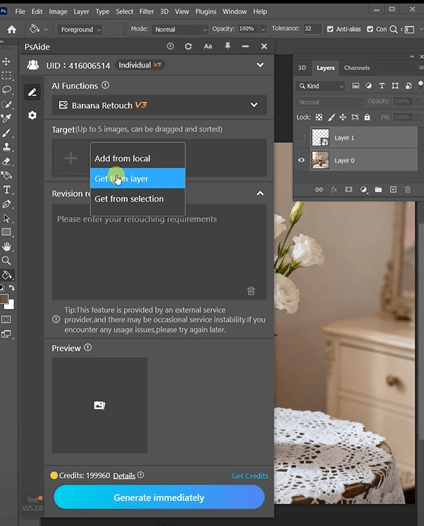
- Enter Prompt in the Prompt Box: Locate the prompt box in the NanoBanana interface and type the clear instruction: “Change picture 1 to picture 2”.
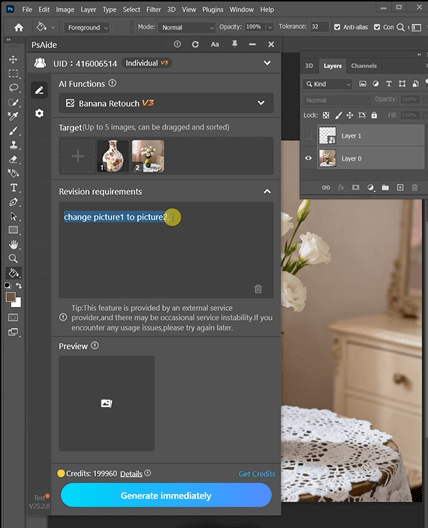
- One-Click Generate and Refine: Click the “One-Click Generate” button. NanoBanana processes the request in 3–5 seconds, generating the photo with the old vase replaced by the new one. Use the “Fine-Tune” slider to adjust the vase’s position or tweak its size slightly if needed, then save the final image directly in Photoshop.
Key Advantages for Home Decor Marketers
NanoBanana cuts production costs by 70% by eliminating expensive reshoots and reduces editing time from days to seconds. It preserves the original scene’s authenticity and ensures the new vase’s details (like glaze, patterns, and shape) are vivid. The tool works for all vase types (ceramic, glass, metal) and scenarios (living rooms, bedrooms, dining areas). No advanced Photoshop or Photo Retouching skills are required, making it a must-have for home decor teams.
Download PsAide today to unlock NanoBanana and streamline your vase image updates—create compelling visuals that boost conversions!
Summary: PsAide’s NanoBanana enables one-click vase replacement in photos via PS with AI, saving time and ensuring natural scene integration.