Table of Contents
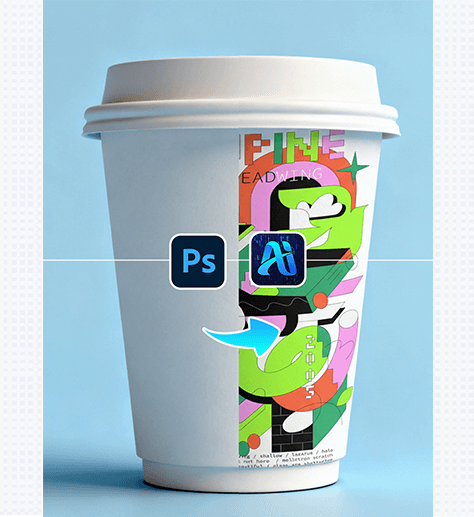
Nano Banana simplifies packaging and branding workflows by letting you add custom graphics to paper cups—preserving the cup’s texture, curvature, and lighting for realistic, professional mockups. Here’s how it works :
1. Pro Tip for Paper Cup Graphic Alignment
Before editing: Prepare your graphic (e.g., a logo, brand pattern, or slogan) as a high-resolution file with a transparent background. For tapered paper cups (common in cafes), use a graphic with a slightly tapered aspect ratio—this helps Nano Banana wrap it smoothly around the cup’s narrowing shape.
2. Key Benefits of Nano Banana for Paper Cup Design
① Adapts to Cup Curvature & Texture: Unlike basic “paste” tools, Nano Banana analyzes the paper cup’s shape to adjust the graphic—making it look printed directly on the cup.
② Matches Lighting & Shadows Automatically: The tool detects the cup’s existing highlights and subtle creases, then tweaks the graphic to blend with these details—no manual shading or warping needed.
3. 3-Step Workflow: Nano Banana + Photoshop
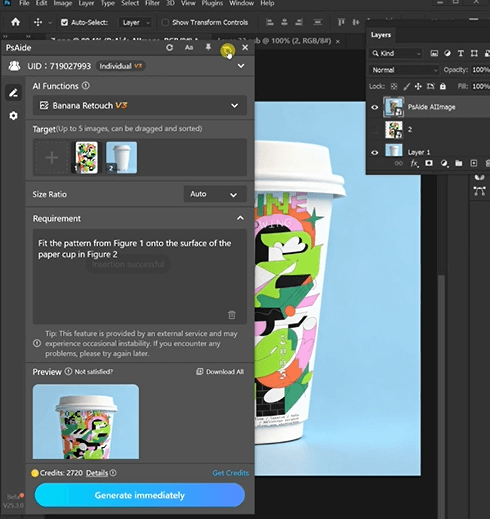
① Import Assets: Open your blank paper cup image and import the image to psaide
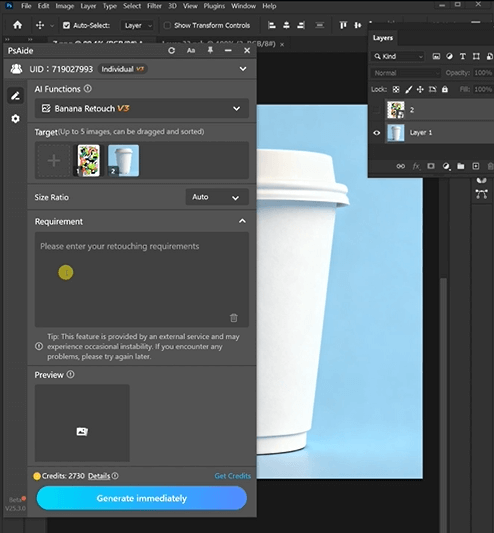
② Define the Graphic Application: In the plugin panel, upload both assets .
Enter a prompt:
Fit the patten from Figure 1 onto the surface of the paper cup in Figure2
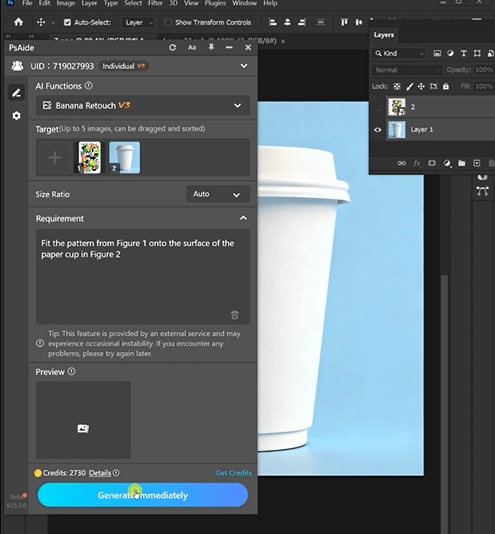
③ Generate & Finalize: Click “Generate Immediately” in Nano Banana. Preview the result—if needed, tweak the prompt and re-generate. Once satisfied, download the final paper cup mockup.
4. Tool Access & Download
Nano Banana is a must-have for brand designers, cafe marketers, and packaging creators needing fast, realistic paper cup mockups.
Download Link: https://psaide.com/?sfrom=ZfhxUK
Invitation Code: ZfhxUK