
Table of Contents
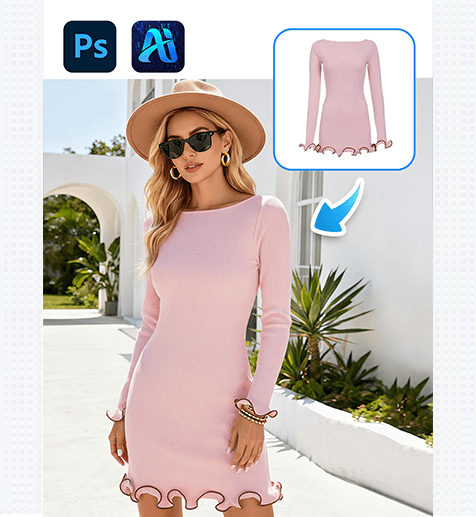
1. Pro Tip for Precise Dress Replacement
Before editing: Duplicate your original image layer (Ctrl+J) to protect the source file. Use Photoshop’s Quick Selection Tool to roughly outline the current dress—avoid selecting the model’s skin/hair, as this helps Nano Banana focus on the garment while preserving the model’s pose and the scene’s lighting.
2. Why Nano Banana Stands Out for Fashion Edits
① Matches Scene Context Flawlessly:
Unlike basic edit tools, Nano Banana analyzes the original image’s lighting, fabric texture, and background to generate a new dress that blends naturally—no awkward color mismatches or unrealistic shadows.
② Saves Studio Resources:
Testing 3+ dress styles used to require hours of styling, re-shooting, and lighting adjustments. With Nano Banana, you can swap dresses in 2-3 minutes, ideal for quickly iterating fashion looks.
3. 3-Step Workflow: Nano Banana + Photoshop
① Import the Base Image: Open your fashion photo in Photoshop, then import your photo to psaide
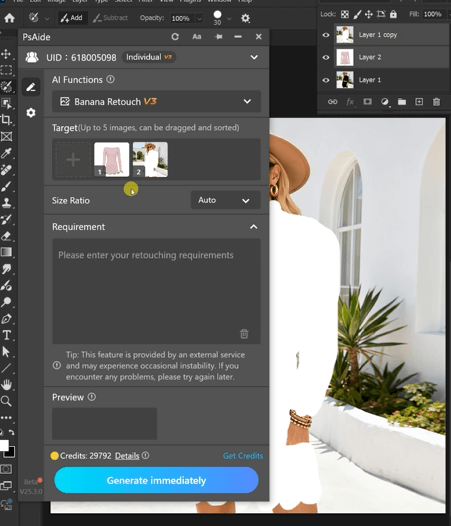
② Define the Dress & Prompt: Use the plugin’s selection tool to mark the current dress, then enter a clear prompt:
Remove the dress from the character in Figure 2and naturally dress them with the dress from Figure 1.
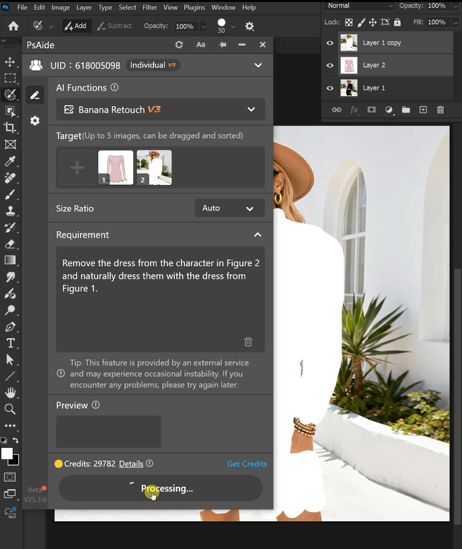
③ Generate & Refine: Click “Generate” in Nano Banana. Preview the result
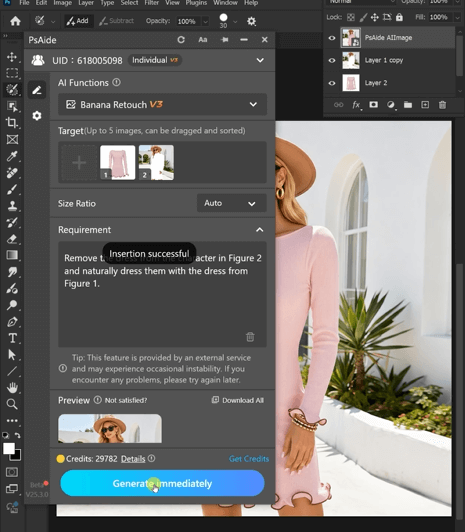
4. Tool Access & Download
Nano Banana integrates seamlessly with Photoshop, making it a must-have for fashion designers, marketers, and content creators.

Download Link: https://psaide.com/?sfrom=ZfhxUK
Invitation Code: ZfhxUK

