Table of Contents
1. The 3D Badge Creation Challenge & AI Solutions
Q: Can AI really convert flat images into convincing 3D badges with proper depth and lighting?
A: Yes, absolutely. Traditional badge creation in Photoshop involves multiple complex steps: creating circular selections, adding bevel and emboss effects, applying gradients for metallic looks, and manually adjusting lighting to simulate depth. This process requires both design skills and technical knowledge of layer styles and blending modes.
Q: What makes Nano Banana Pro different from standard badge templates?
A: While templates offer pre-made shapes, they lack customization and realistic material adaptation. Nano Banana Pro analyzes your specific image content, understands color schemes and character details (like those from Zootopia), and intelligently applies 3D transformation that maintains the original artwork’s personality while adding professional badge aesthetics.
2. What You’ll Need
- Adobe Photoshop(2015+) with PsAide plugin installed
- Click to get
- Character image or artwork (like Zootopia characters)

- Clear subject with recognizable features
- 2-3 minutes total processing time
3. The Professional Badge Creation Process
Step 1: Prepare Your Source Image
Open your chosen image in Photoshop. For character-based badges like Zootopia designs, select images where the subject is clearly visible and centered. The AI works best with images that have good contrast and recognizable features. No pre-cropping or background removal is necessary—the Pro version will handle composition automatically.
Step 2: Configure Pro Settings and Command
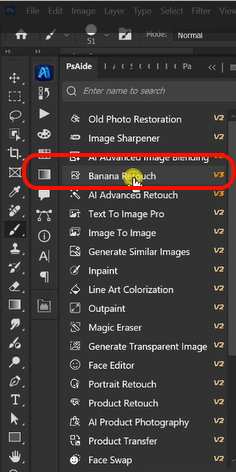
Launch Nano Banana and select the Pro version from the options menu. Before uploading, set the aspect ratio to 1:1—this ensures perfect square formatting ideal for circular badges. Upload your single image file to the interface. In the prompt box, enter this specific command:
“Actual mockup effect of converting images into circular 3D badges with metallic edges and realistic lighting.”

Step 3: Generate Professional 3D Badges
Click “Generate” and wait 45-60 seconds. The AI performs sophisticated 3D transformation: it creates a perfect circular composition around your subject, adds dimensional depth with appropriate shadows and highlights, applies realistic metallic edge effects, simulates proper badge curvature and lighting, and maintains your original image’s colors and details within the 3D context. The result is a professional badge mockup ready for presentation or production.

4. Practical Applications & Design Tips
This technique is perfect for:
- Fan Merchandise: Create badge designs for movie or game characters
- Brand Marketing: Develop badge-style logos and promotional materials
- Event Materials: Design badges for conferences, teams, or special events
- Product Packaging: Create badge elements for product labels and packaging
- Digital Assets: Generate badge graphics for apps, websites, and social media
Pro Tips: For character badges like Zootopia designs, choose images where faces or distinctive features are prominent—the AI will center these elements within the badge composition. The metallic edge effect works particularly well with characters that have clear outlines and contrasting colors. If your initial result needs adjustment, simply regenerate with additional prompt details like “brushed metal edges” or “vintage enamel badge style” for different aesthetic variations.
Download link
https://psaide.com/?sfrom=A86R4u
Invitation Code: A86R4u