
Table of Contents
The Fashion Editing Challenge
You have a perfect model photo, but the skirt needs to change. Manually swapping a skirt in Photoshop requires precise masking around the waist, realistic fabric draping, matching shadows, and keeping the original pose natural. This process takes 20-30 minutes even for experts.
Now you can do it in 3 steps with Nano Banana in Photoshop.
https://psaide.com/?sfrom=A86R4u
Invitation Code: A86R4u
1.3-Step Skirt Replacement Process
Step 1: Mark the Original Skirt in Red
Open both your model photo and the new skirt image in Photoshop. On the model photo, use the Lasso Tool to select the current skirt.
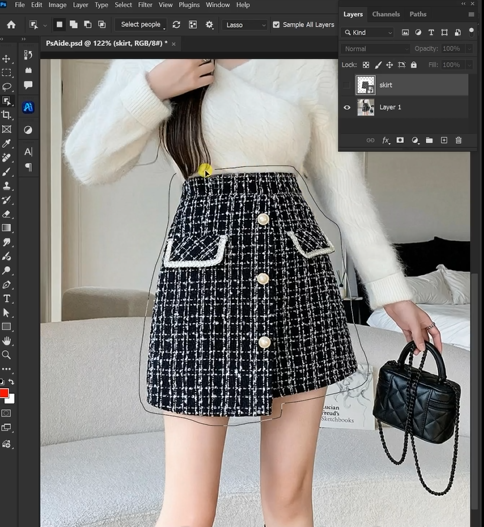
Fill this selection with bright red (RGB: 255,0,0). This red marker tells the AI exactly what to replace.
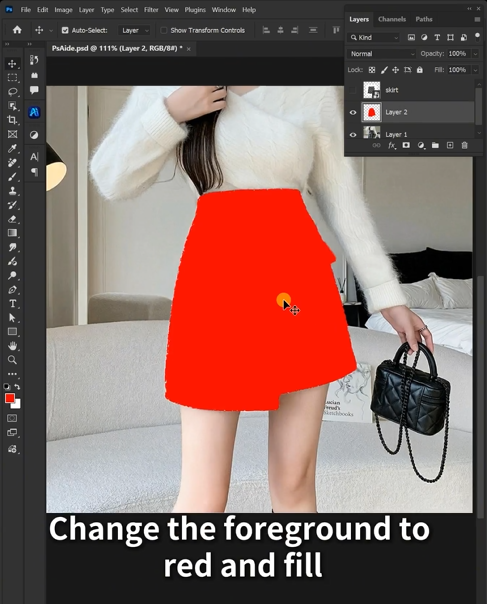
Step 2: Command the AI
Open Nano Banana and select the Pro version. Choose your output ratio (1:1 works perfectly for most fashion images). Upload both images. In the prompt box, enter:
“Please dress the model in Image 1 in the short skirt from Image 2. Match the lighting, keep the pose natural.”
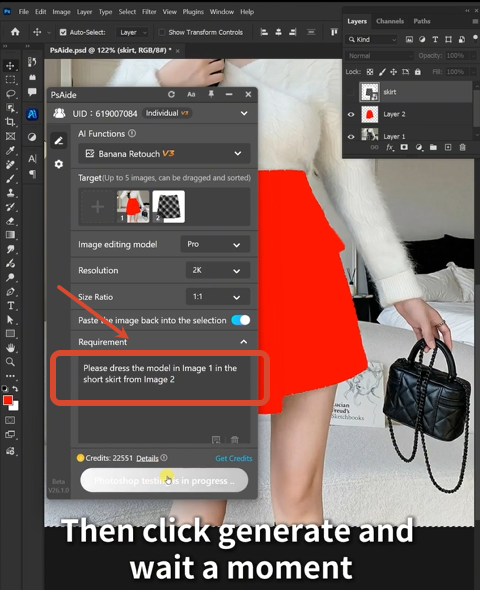
Step 3: Generate
Click Generate. The AI will remove the red-marked skirt, place the new skirt on the model, match the waist position, adjust fabric folds to the pose, and blend lighting and shadows. The result looks like the model wore it from the start.
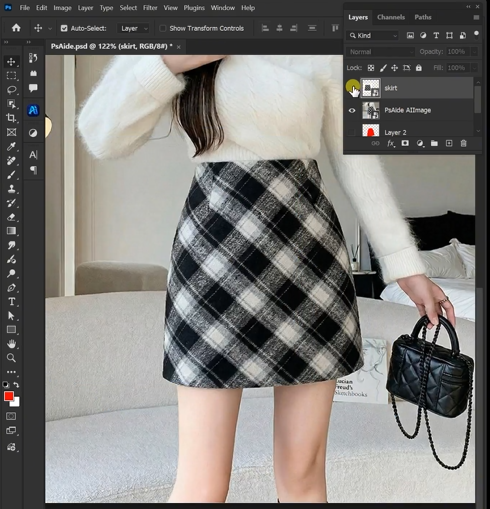
2.Quick Tips for Perfect Results
- Choose a new skirt image with similar lighting to your model photo
- The red marker doesn’t need perfect edges, just cover the skirt area
- For best fabric flow, pick a model pose where the legs are clearly visible
3.Download link

https://psaide.com/?sfrom=A86R4u
Invitation Code: A86R4u

