Table of Contents
You have a beautiful food scene. A casserole dish sits on a rustic table, surrounded by ingredients and natural light. The composition is perfect. The setting tells a story. The mood is just right.
But the casserole is wrong. The client switched suppliers. The new dish has a different shape, color, or size. Or you need to show multiple casserole options in the same setting.
What do you do?
Reshoot? That means rebuilding the entire scene. Finding the same table. Matching the same lighting. Styling the same ingredients. Thousands of dollars. Days of work.
Manually edit in Photoshop? A casserole dish is a three-dimensional object with depth, reflective surfaces, and interior shadow. Replacing it while keeping the surrounding scene unchanged is extremely difficult. You need to match the angle, preserve the table shadows, maintain the perspective—all while making the new dish look like it was photographed in that exact spot.
Most brands live with the wrong product in the photo. Their marketing suffers. Customers see outdated items. Trust erodes.
1、The Solution: Nano Banana Pro in 3 Steps
Here’s how to replace any casserole dish in a scene using AI inside Photoshop.
What You Need
- Adobe Photoshop with PsAide plugin (integrates Nano Banana Pro)
- One scene photo with the original casserole
- One product photo of your new casserole
- 60 seconds
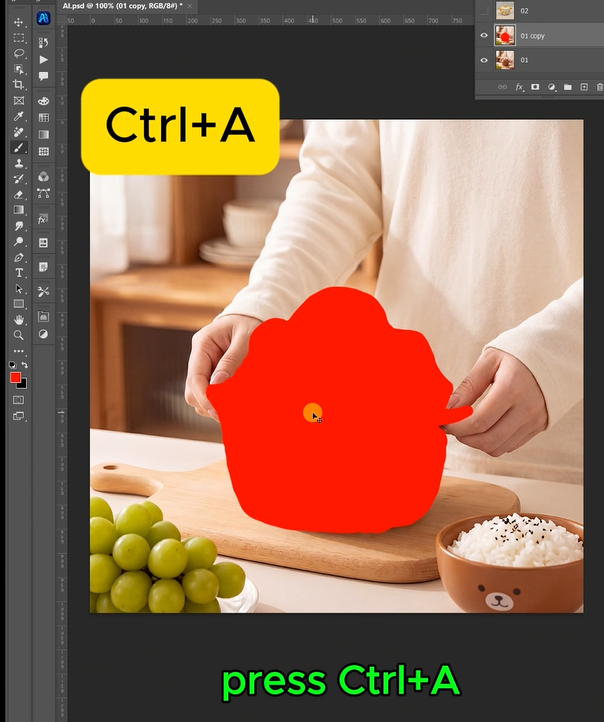
Step 1: Mark the Old Casserole in Red
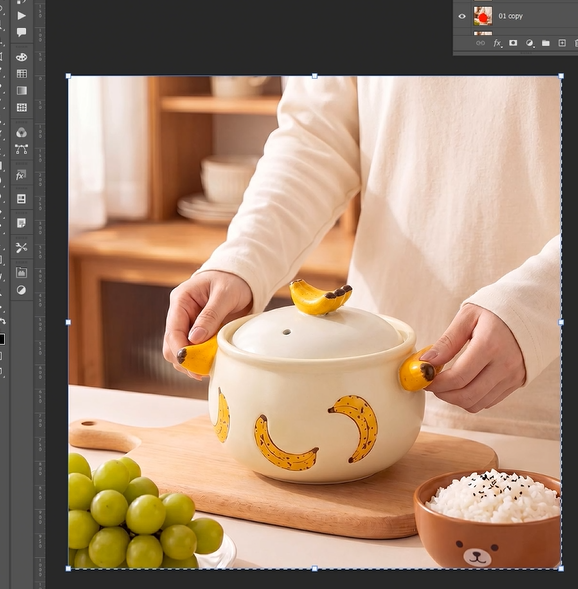
Open your scene photo in Photoshop. Grab the Lasso Tool. Draw a rough selection around the original casserole dish. Include the entire visible surface—the rim, the body, any handles. Don’t worry about perfect edges.
Fill the selection with bright red (RGB: 255, 0, 0). This red marker tells the AI exactly what object to replace, preserving everything else in the scene .
Step 2: Write Your Prompt
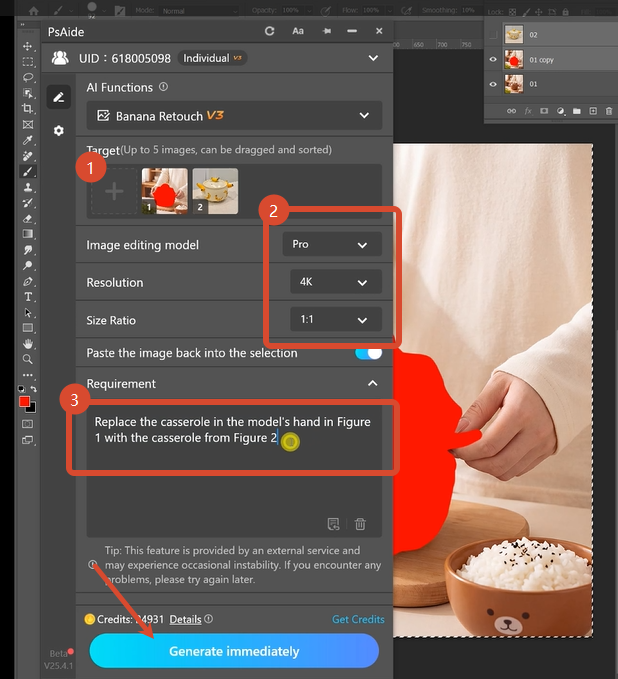
Open the PsAide panel. Launch Nano Banana and select the Pro version. Set output resolution to 4K. This preserves the fine details of your food scene and the new casserole’s texture .
Upload your two images in the correct order:
- Figure 1: Your scene photo with the red-marked casserole
- Figure 2: Your new casserole product photo
Type this exact command:
“Replace the casserole in the model’s hand in Figure 1 with the casserole from Figure 2”
Click Generate. Wait 45-60 seconds.
Step 3: Get Your Result
The AI analyzes the red-marked area. It studies the surrounding scene—the table surface, the lighting direction, the shadows. It removes the old casserole. It places the new dish at the same angle and perspective. It matches the lighting and generates realistic table shadows.
Your scene is now showing the new casserole. Same table. Same lighting. Same composition. Different product.
2、Pro Tips for Perfect Casserole Swaps
1. Mark the entire casserole. Include the rim, body, handles, and any visible interior. The AI needs to see the complete object to replace it correctly.
2. Use 4K resolution for food scenes. Food photography has fine details—table linens, ingredient textures, dish glazes. 4K preserves these details .
3. Match the general shape. A round casserole swaps better with another round casserole. The AI handles different shapes, but similar silhouettes yield faster, cleaner results.
4. Consider the handles. If your original casserole has handles and the new one doesn’t (or vice versa), add “without handles” or “including handles” to your prompt for accuracy.
5. Preserve the scene context. The AI excels at maintaining lighting consistency—a key advantage over manual Photoshop work . Trust the model to handle shadows and reflections automatically.
6. Keep your original layers. Save the PSD with your red marking. You can reuse the same scene photo to swap multiple casserole styles in seconds .
7. Batch similar products. Once you have a prompt that works, apply the same logic to entire product catalogs. Nano Banana Pro processes each image consistently .
3、Summary
You don’t need to rebuild the scene. You don’t need to match perspective by eye. You don’t need to repaint shadows.
One red marker. One clear prompt. One minute at 4K.
Your casserole scene shows any dish you want. The lighting matches. The shadows fall correctly. The table setting stays intact.
4、Download link

https://psaide.com/?sfrom=A86R4u
Invitation Code: A86R4u