Table of Contents
Restoring and colorizing faded old photos is a frequent task for designers, archivists, and photo editors working in Ps, yet native Photoshop tools create numerous frustrating obstacles. Manual restoration demands hours of repetitive work using the Clone Stamp, Healing Brush, and color balance adjustments. Old photos often carry heavy scratches, faded areas, creases, dust spots, and lost texture details; beginners struggle to erase damage without blurring facial features or background elements. Adding realistic, natural colors brings extra challenges—most manual color layers produce unnatural, oversaturated skin tones or mismatched clothing hues. A single damaged vintage photograph can take 30 minutes or longer to retouch, making batch family photo restoration extremely inefficient. These persistent pain points of traditional Ps editing can be fully eliminated with Nano Banana, the AI retouch module integrated into the Psaide plugin, which completes scratch repair and automatic photo colorization with one simple prompt.
1、Step-by-Step Guide to Old Photo Color Restoration with Psaide Nano Banana in PS
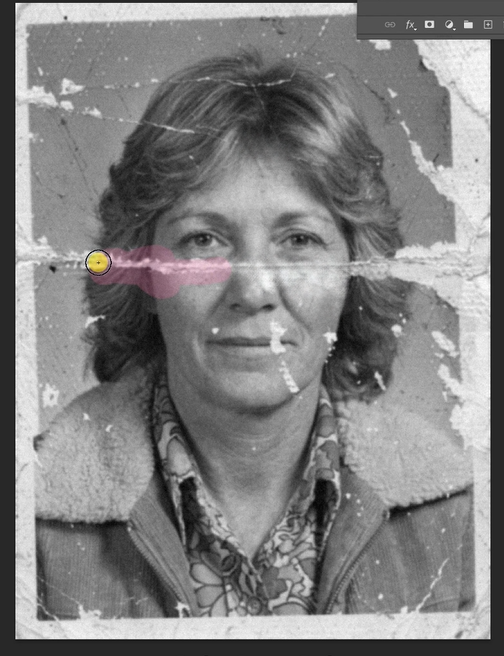
Step 1: Import the vintage photo file into Photoshop
Launch your Ps software and open the scanned black-and-white or faded old photo you want to restore. Press Ctrl+J to duplicate the original photo layer, protecting the unedited vintage file from permanent damage. No manual scratch removal or color layering is needed in advance for this workflow.
Step 2: Launch Nano Banana Pro and configure high-quality parameters
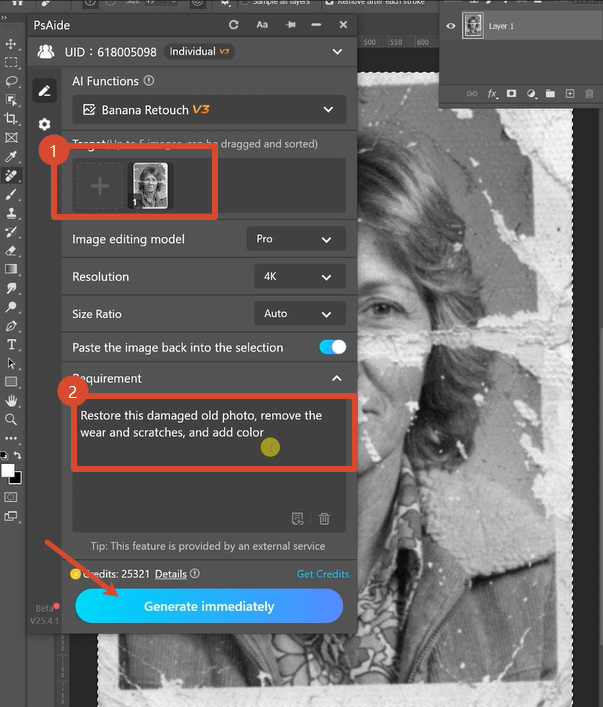
Open the Psaide plugin panel inside Photoshop and enter the Nano Banana retouch function. Be sure to select the Pro version for advanced texture reconstruction and accurate color rendering. Set the output resolution to 4K to preserve delicate facial textures, fabric lines and subtle background details lost in low-resolution exports. Upload your duplicated old photo layer to the plugin’s upload area, then paste this precise prompt into the text input box:
Restore this damaged old photo, remove the wear and scratches, and add color.
Step 3: Generate and preview the fully restored colored photograph
Click the Generate button and wait roughly 20 to 30 seconds for AI processing. Nano Banana intelligently erases all scratches, dust and creases, reconstructs missing faded details, and adds realistic, balanced natural colors across the whole image. The finished 4K restored photo will automatically load as a new layer within your Ps canvas, ready for direct saving, printing or digital archiving with zero additional manual touch-ups.
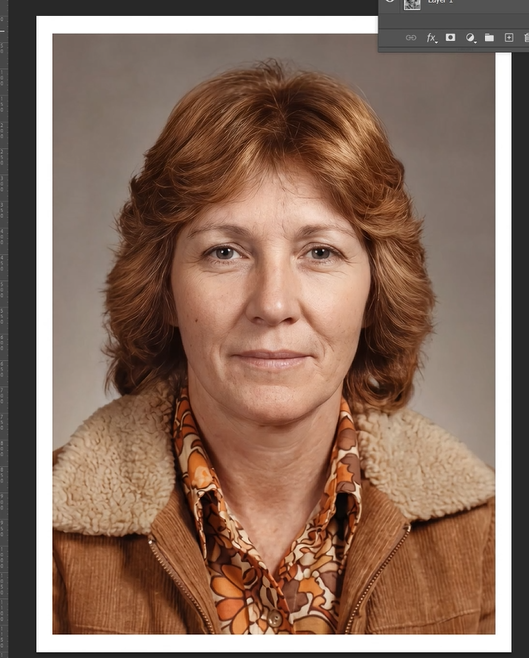
2、Useful Tips for High-Quality Nano Banana Old Photo Restoration
Always choose Nano Banana Pro instead of basic mode for heavily scratched or severely faded old photos, as it delivers sharper detail reconstruction. Keep the 4K resolution setting enabled to maintain archival-level image clarity for printing and storage. Use clear, well-lit scans of old photos without heavy blurriness to boost AI recognition accuracy. Retain the recommended prompt text unchanged to ensure consistent scratch removal and natural color grading. For bulk restoration of family photo collections, reuse identical Nano Banana resolution and prompt settings to achieve unified color tones and texture quality, drastically cutting down daily Ps editing workloads. between hours of manual retouching and working with AI.
3、Download link

https://psaide.com/?sfrom=A86R4u
Invitation Code: A86R4u